Enhance team collaboration with the best smart whiteboards. Explore interactive displays for brainstorming and remote participation.
Best Smart Whiteboards for Collaborative Workspaces
Revolutionizing Team Collaboration with Interactive Displays
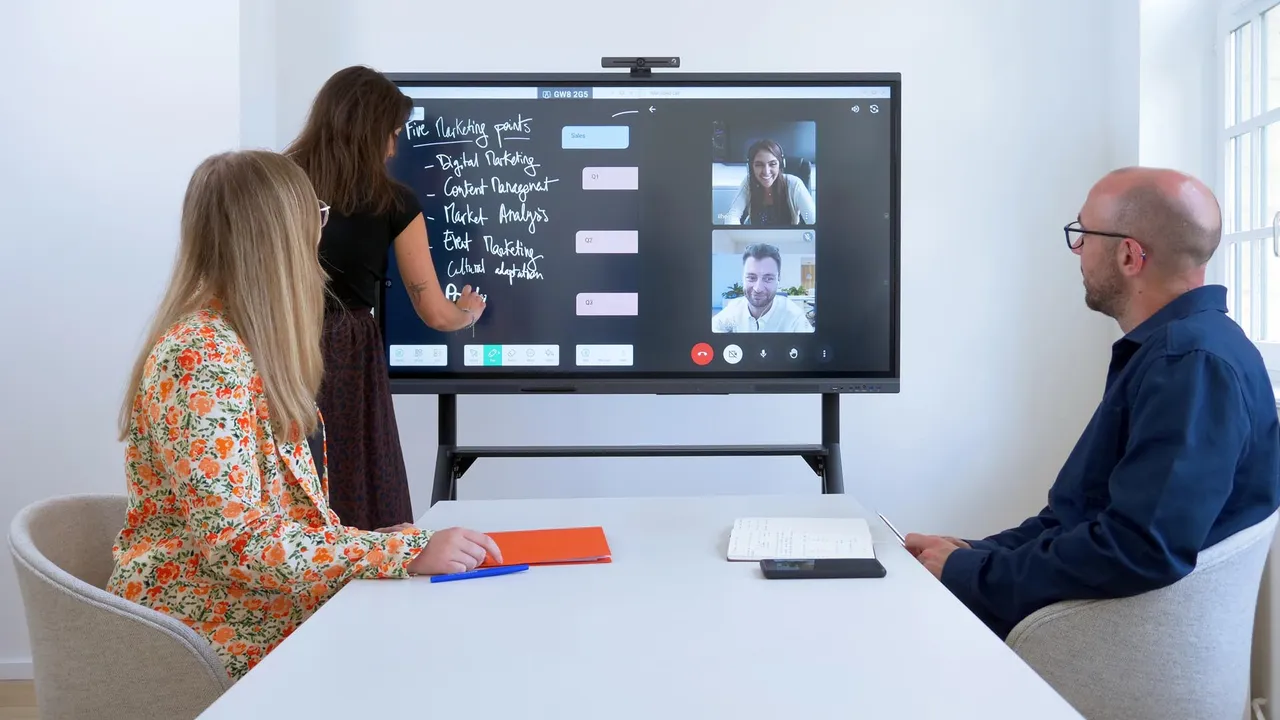
Hey there, ever felt like your team meetings could use a serious upgrade? Tired of scribbling on traditional whiteboards only to snap a blurry photo with your phone and then struggle to share notes? Well, you're in luck because smart whiteboards are here to change the game. These aren't just fancy screens; they're interactive powerhouses designed to boost productivity, foster creativity, and make collaboration seamless, whether your team is in the same room or spread across the globe.
Smart whiteboards, also known as interactive flat panels (IFPs) or interactive displays, combine the best of traditional whiteboards with the power of digital technology. Imagine a giant tablet that lets you write, draw, annotate, browse the web, run applications, and even conduct video conferences, all from one central hub. They're becoming indispensable tools in modern offices, classrooms, and even home offices, transforming how we brainstorm, present, and connect.
Key Features to Look for in Smart Whiteboards
When you're diving into the world of smart whiteboards, it's easy to get overwhelmed by the sheer number of options and features. To help you make an informed decision, let's break down the most important aspects to consider:
Display Size and Resolution for Optimal Viewing Experience
Size matters, especially when you're trying to ensure everyone in the room can see what's happening. Smart whiteboards come in various sizes, typically ranging from 55 inches to 86 inches or even larger. For smaller huddle rooms or personal offices, a 55-inch or 65-inch display might be perfect. For larger conference rooms or classrooms, you'll want to lean towards 75-inch or 86-inch models. As for resolution, 4K UHD (3840 x 2160) is pretty much the standard now, offering crisp, clear visuals that make text and images pop.
Touch Technology and Responsiveness for Seamless Interaction
This is where the 'smart' in smart whiteboard truly shines. You want a display that's highly responsive to touch, allowing for smooth writing and drawing without lag. Look for multi-touch capabilities, which enable several people to interact with the board simultaneously. Some boards use infrared (IR) touch, while others might use projected capacitive (PCAP) or electromagnetic resonance (EMR) technology. PCAP often offers a more precise and fluid writing experience, similar to a high-end tablet.
Operating System and Software Compatibility for Versatile Use
Most smart whiteboards run on Android, but many also offer a built-in Windows PC module or allow you to connect an external computer. An Android OS provides a user-friendly interface and access to a wide range of apps. However, if your team heavily relies on Windows-based software like Microsoft Office or specific design tools, ensuring seamless compatibility or having a Windows module is crucial. Look for pre-installed collaboration software, annotation tools, and screen-sharing capabilities.
Connectivity Options for Easy Device Integration
A smart whiteboard is only as good as its ability to connect with other devices. Make sure it has plenty of HDMI, USB, and USB-C ports for connecting laptops, cameras, and other peripherals. Wireless connectivity, including Wi-Fi and Bluetooth, is essential for screen mirroring from mobile devices and laptops without the clutter of cables. Ethernet ports are also important for stable network connections, especially for video conferencing.
Built-in Audio and Video Conferencing Capabilities for Remote Teams
For hybrid and remote teams, integrated cameras and microphones are a game-changer. This turns your smart whiteboard into a complete video conferencing solution, allowing you to host virtual meetings directly from the display. Look for features like echo cancellation and noise reduction for clear audio, and wide-angle cameras to capture everyone in the room.
Security Features for Protecting Sensitive Information
In a professional setting, data security is paramount. Check for features like secure login, data encryption, and the ability to easily erase meeting content after a session. Some boards offer guest modes or temporary user profiles to ensure sensitive information isn't left behind.
Top Smart Whiteboard Products on the Market
Alright, let's get to the good stuff! Here are some of the leading smart whiteboards that are making waves in collaborative workspaces, along with their typical use cases and price ranges.
1. Microsoft Surface Hub 2S: The Premium Collaboration Powerhouse
The Microsoft Surface Hub 2S is a sleek, powerful, and highly integrated collaboration device. It's essentially a giant Windows 10 computer designed for teamwork. It runs Microsoft Teams, Whiteboard, and all your favorite Microsoft 365 apps natively, making it incredibly intuitive for anyone familiar with the Microsoft ecosystem.
- Key Features: Stunning 4K+ resolution, 3:2 aspect ratio for more vertical workspace, 4K camera, far-field mics, modular design (you can upgrade the compute cartridge), and seamless integration with Microsoft Teams and Microsoft 365. It also supports the Surface Hub 2 Pen for precise writing.
- Use Cases: Ideal for large enterprises, executive boardrooms, and organizations heavily invested in the Microsoft ecosystem. Perfect for complex brainstorming sessions, detailed presentations, and high-quality video conferencing.
- Typical Price Range: This is a premium device, so expect to pay anywhere from $9,000 to $22,000+ depending on the size (50-inch or 85-inch) and configuration.
2. Google Jamboard: Simplicity and Cloud Integration
Google Jamboard is Google's take on the smart whiteboard, designed for simplicity and deep integration with Google Workspace (formerly G Suite). It's a 55-inch 4K display that focuses on intuitive digital whiteboarding and cloud-based collaboration.
- Key Features: Easy-to-use interface, real-time collaboration with remote participants via the Jamboard app, integration with Google Drive, Meet, and other Workspace apps. It comes with a stylus and eraser that don't require batteries.
- Use Cases: Excellent for small to medium-sized businesses, educational institutions, and teams that primarily use Google Workspace for their daily operations. Great for quick brainstorming, design sprints, and interactive lessons.
- Typical Price Range: Around $4,999 for the display, plus an annual management fee of about $600.
3. Samsung Flip: Versatility and User-Friendliness
The Samsung Flip series (Flip 2, Flip 3, etc.) offers a highly versatile and user-friendly smart whiteboard experience. What sets it apart is its ability to rotate from landscape to portrait mode, making it incredibly flexible for different content types and presentation styles.
- Key Features: 4K UHD display, smooth pen-to-paper writing experience, multi-touch up to 4 users, screen sharing via Wi-Fi or HDMI, built-in web browser, and a variety of templates for different meeting types. The Flip 3 also boasts enhanced security and durability.
- Use Cases: Perfect for creative agencies, design studios, educational settings, and any business that values flexibility in presentation. Its rotating screen is particularly useful for vertical content like documents or social media feeds.
- Typical Price Range: From $2,500 (55-inch) to $6,500 (85-inch), making it a more accessible option for many businesses.
4. Promethean ActivPanel: Education and Enterprise Focused
Promethean is a well-known name in the education sector, and their ActivPanel series brings robust features to both classrooms and corporate environments. They are known for their durable build and comprehensive software suites.
- Key Features: High-precision writing, multi-user interaction, ActivInspire and ClassFlow software for interactive lessons and presentations, robust security features, and a focus on health and safety with low blue light and anti-glare screens. Many models offer a built-in Android module and an optional Windows OPS (Open Pluggable Specification) slot.
- Use Cases: Widely adopted in K-12 and higher education for interactive teaching. Also suitable for corporate training rooms and collaborative meeting spaces that require advanced annotation and presentation tools.
- Typical Price Range: Generally ranges from $3,000 to $8,000+, depending on size (65-inch to 86-inch) and specific model features.
5. ViewSonic ViewBoard: Value and Performance
ViewSonic's ViewBoard series offers a compelling balance of features, performance, and affordability, making them a popular choice for various settings.
- Key Features: 4K UHD display, 20-point multi-touch, myViewBoard software for cloud-based content sharing and collaboration, built-in Android OS, and optional Windows OPS. They often include features like dual-pen support, instant annotation, and screen recording.
- Use Cases: Excellent for small to medium-sized businesses, startups, and schools looking for a feature-rich smart whiteboard without breaking the bank. Good for general collaboration, presentations, and interactive learning.
- Typical Price Range: From $2,000 (55-inch) to $7,000+ (86-inch), offering competitive pricing across different sizes.
Comparing the Best Smart Whiteboards: Which One is Right for You?
Choosing the 'best' smart whiteboard really depends on your specific needs, budget, and existing tech ecosystem. Let's do a quick comparison to help you narrow it down:
For Microsoft Ecosystem Users: Surface Hub 2S
If your organization lives and breathes Microsoft 365 and Teams, the Surface Hub 2S is a no-brainer. Its native integration means zero friction, and the premium hardware delivers an unparalleled experience. Yes, it's an investment, but for seamless enterprise-level collaboration, it's hard to beat.
For Google Workspace Enthusiasts: Google Jamboard
If your team is all about Google Docs, Sheets, and Meet, the Jamboard will feel right at home. Its simplicity and cloud-first approach make it incredibly easy to pick up and use, especially for quick, spontaneous brainstorming sessions. The ongoing subscription fee is something to factor in, though.
For Versatility and Design: Samsung Flip
The Samsung Flip is a fantastic all-rounder. Its rotating screen is a unique selling point that adds a lot of flexibility, especially for creative teams or those who frequently work with vertical content. It's also generally more affordable than the Surface Hub, offering great value.
For Education and Robust Features: Promethean ActivPanel
If you're in education or need a highly durable and feature-rich panel with comprehensive software for interactive lessons and training, Promethean is a top contender. Their focus on the learning environment translates well into corporate training and development.
For Budget-Conscious Buyers: ViewSonic ViewBoard
The ViewSonic ViewBoard offers a compelling package of features and performance at a more accessible price point. It's a solid choice for businesses and schools that need a reliable smart whiteboard without the premium price tag of some competitors.
Setting Up Your Smart Whiteboard for Success
Once you've picked your perfect smart whiteboard, getting it set up correctly is key to maximizing its potential. Here are a few tips:
Optimal Placement and Mounting for Visibility and Accessibility
Think about where your whiteboard will live. Ensure it's visible to everyone in the room, free from glare, and at a comfortable height for interaction. Most smart whiteboards can be wall-mounted or placed on a mobile stand. Mobile stands offer flexibility, allowing you to move the board between different rooms or even reconfigure your meeting space on the fly.
Network Configuration for Seamless Connectivity
A stable and fast network connection is crucial. If you're relying on Wi-Fi, make sure your access point is strong enough to handle the bandwidth, especially during video calls or when sharing large files. For mission-critical applications, a wired Ethernet connection is always recommended.
Software Installation and Updates for Peak Performance
Make sure all pre-installed software is up to date. If you're integrating with specific collaboration platforms (like Zoom, Webex, or Google Meet), download and install their apps. Regularly check for firmware updates from the manufacturer, as these often bring new features, performance improvements, and security patches.
Training Your Team for Maximum Adoption
Even the most intuitive tech needs a little introduction. Conduct a brief training session for your team, showing them how to use the basic features like writing, erasing, saving notes, and screen sharing. Encourage them to experiment and discover new ways to collaborate. The more comfortable they are, the more they'll use it.
The Future of Collaboration: Beyond the Smart Whiteboard
Smart whiteboards are just one piece of the puzzle in the evolving landscape of collaborative technology. We're seeing exciting developments that will further enhance how teams work together:
Integration with AI and Machine Learning for Enhanced Productivity
Imagine a smart whiteboard that can automatically transcribe your meeting notes, summarize key discussion points, or even suggest relevant information based on your brainstorming session. AI and machine learning are poised to make smart whiteboards even smarter, turning raw ideas into actionable insights.
Virtual and Augmented Reality for Immersive Remote Collaboration
While smart whiteboards bridge the gap for hybrid teams, VR and AR technologies are taking remote collaboration to the next level. Picture virtual meeting rooms where participants from different locations can interact with a shared 3D whiteboard, manipulate virtual objects, and feel truly present. This is still emerging, but the potential is huge.
Seamless Cloud-Based Workflows for Global Teams
The trend towards cloud-native applications and seamless integration will continue. Smart whiteboards will become even more deeply embedded in cloud workflows, allowing for instant saving, sharing, and access to content from anywhere, on any device. This is crucial for global teams working across different time zones.
So, whether you're looking to upgrade your meeting room, enhance your classroom, or simply make your team more productive, a smart whiteboard is a powerful tool to consider. They're not just about replacing old whiteboards; they're about transforming the way we connect, create, and innovate together.
:max_bytes(150000):strip_icc()/277019-baked-pork-chops-with-cream-of-mushroom-soup-DDMFS-beauty-4x3-BG-7505-5762b731cf30447d9cbbbbbf387beafa.jpg)