Comparing Project Management Software for Teams
Hey there, team leaders and project managers! Are you tired of juggling spreadsheets, endless email threads, and scattered documents trying to keep your projects on track? If so, you're definitely not alone. In today's fast-paced work environment, having the right project management software isn't just a nice-to-have; it's absolutely essential for keeping your team organized, productive, and sane. We're talking about tools that can transform how your team collaborates, tracks tasks, manages deadlines, and reports on progress. But with so many options out there, how do you pick the one that's perfect for your team's unique needs? Let's dive deep into comparing some of the top project management software solutions available today, looking at their features, use cases, pricing, and what makes each one stand out.
Understanding Project Management Software Key Features and Benefits
Before we get into specific products, let's quickly cover what makes project management software so valuable. At its core, this type of software helps teams plan, execute, and monitor projects from start to finish. Think of it as your central hub for all project-related activities. Here are some common features you'll find:
- Task Management: Assigning tasks, setting deadlines, tracking progress, and breaking down larger tasks into smaller, manageable subtasks.
- Collaboration Tools: Real-time communication, file sharing, commenting on tasks, and shared calendars to keep everyone on the same page.
- Workflow Automation: Automating repetitive tasks, setting up triggers, and streamlining processes to save time and reduce manual errors.
- Reporting and Analytics: Generating reports on project progress, team performance, resource allocation, and identifying bottlenecks.
- Resource Management: Allocating team members and other resources to tasks, ensuring no one is overloaded or underutilized.
- Time Tracking: Monitoring how much time is spent on specific tasks or projects, useful for billing clients or analyzing productivity.
- Gantt Charts and Kanban Boards: Visual representations of project timelines and workflows, making it easier to see the big picture and individual task statuses.
- Integrations: Connecting with other tools your team already uses, like Slack, Google Drive, Microsoft Office, or CRM systems.
The benefits are pretty clear: improved efficiency, better communication, reduced risk of missed deadlines, enhanced accountability, and ultimately, more successful projects. Now, let's look at some of the heavy hitters in the project management software arena.
Asana The Flexible Workflow Powerhouse for Teams
Asana is a super popular choice, especially for teams that need a lot of flexibility in how they visualize and manage their work. It's known for its clean interface and robust features that cater to a wide range of project types, from marketing campaigns to software development.
Asana Key Features and Use Cases
- Multiple Project Views: Asana shines here. You can view your projects as lists, Kanban boards, Gantt charts (called Timeline in Asana), or even calendars. This flexibility means different team members can work in the view that suits them best.
- Task Dependencies: Easily link tasks so that one can't start until another is completed, which is crucial for complex projects.
- Custom Fields: Tailor your tasks with custom fields to track specific information relevant to your project, like priority levels, client names, or budget codes.
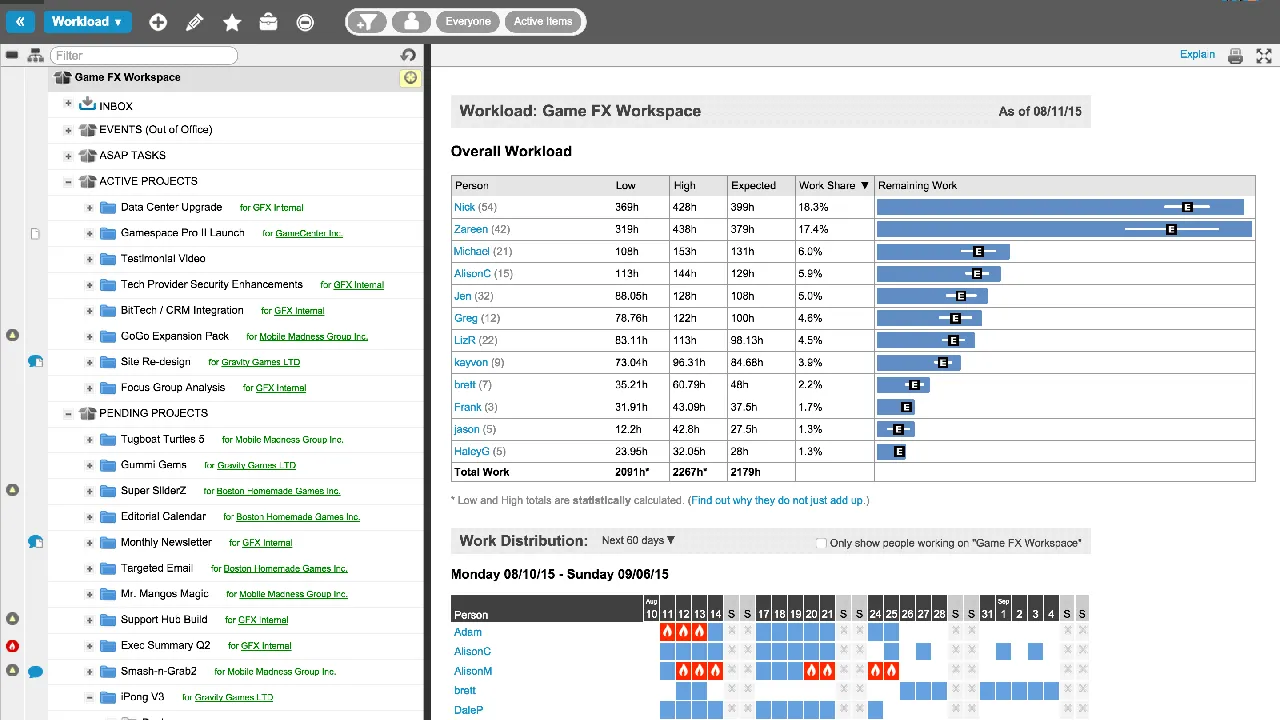
- Workload Management: Get a clear overview of your team's capacity to prevent burnout and ensure even distribution of tasks.
- Automation Rules: Set up rules to automatically assign tasks, update statuses, or move tasks between sections based on certain triggers. This is a huge time-saver!
- Integrations: Asana integrates with hundreds of tools, including Slack, Zoom, Google Drive, Microsoft Teams, Salesforce, and many more.
Who is Asana Best For
Asana is fantastic for marketing teams, creative agencies, product development teams, and even non-profits. It's particularly well-suited for teams that need a highly visual way to track progress and manage diverse workflows. If your team values flexibility in how they see their work and needs strong collaboration features, Asana is definitely worth considering.
Asana Pricing Tiers and Value
- Basic (Free): Great for individuals or small teams just starting out. It includes unlimited tasks, projects, messages, and file storage (up to 100MB per file).
- Premium (Starts at $10.99 per user/month billed annually): Unlocks features like Timeline (Gantt charts), advanced search, custom fields, and unlimited dashboards. This is where Asana really starts to shine for growing teams.
- Business (Starts at $24.99 per user/month billed annually): Adds workload management, portfolios, advanced integrations, and custom rule builders. Ideal for larger organizations managing multiple projects and teams.
- Enterprise (Custom Pricing): For very large organizations needing advanced security, control, and support.
Asana offers excellent value, especially with its Premium tier, which provides a significant jump in functionality for a reasonable price. The free tier is also one of the most generous among project management tools.
Jira Software The Agile Development Powerhouse for Tech Teams
If you're in software development, IT, or any team that practices Agile methodologies like Scrum or Kanban, Jira Software is probably already on your radar, or you're using it. Developed by Atlassian, Jira is purpose-built for tracking bugs, managing issues, and facilitating complex software development workflows.
Jira Software Key Features and Use Cases
- Agile Boards: Jira offers highly customizable Scrum and Kanban boards that are central to Agile development. You can easily manage backlogs, sprints, and releases.
- Issue Tracking: This is where Jira truly excels. It allows for detailed tracking of bugs, feature requests, and any other 'issues' that arise during development.
- Custom Workflows: You can design highly specific workflows to match your team's development process, with custom statuses, transitions, and permissions.
- Roadmaps: Visualize your product roadmap and plan future development, linking initiatives to epics and stories.
- Reporting: Generate a wide array of Agile-specific reports, like burndown charts, sprint reports, and velocity charts, to track team performance and project health.
- Integrations: Being an Atlassian product, Jira integrates seamlessly with other Atlassian tools like Confluence (for documentation) and Bitbucket (for code management). It also has a vast marketplace of third-party integrations.
Who is Jira Software Best For
Jira is the go-to for software development teams, IT operations, and any technical team that follows Agile methodologies. If your team needs robust issue tracking, sprint planning, and detailed reporting for complex technical projects, Jira is an incredibly powerful tool. It can be a bit overwhelming for non-technical teams due to its depth and terminology, but for its target audience, it's unparalleled.
Jira Software Pricing Tiers and Value
- Free (Up to 10 users): Includes core features for small teams, with Scrum and Kanban boards, backlog, and basic reporting.
- Standard (Starts at $7.75 per user/month): Offers more users (up to 35,000), advanced permissions, audit logs, and 250 GB storage.
- Premium (Starts at $15.25 per user/month): Adds unlimited storage, advanced roadmaps, sandbox environments, and 99.9% uptime SLA.
- Enterprise (Custom Pricing): For large enterprises needing centralized user management, data residency, and dedicated support.
Jira's pricing is competitive, especially considering its specialized feature set for technical teams. The free tier is a great way for small dev teams to get started.
Trello The Simple and Visual Kanban Board for Quick Projects
Trello, also an Atlassian product, is famous for its simplicity and visual appeal. It's built around the Kanban board methodology, where tasks are represented as 'cards' that move across 'lists' on a 'board'. If you're looking for something straightforward and highly visual, Trello might be your perfect match.
Trello Key Features and Use Cases
- Kanban Boards: This is Trello's bread and butter. Each board represents a project, lists represent stages of work (e.g., To Do, Doing, Done), and cards are individual tasks.
- Cards: Each card can hold a wealth of information: checklists, due dates, attachments, comments, and assigned members.
- Power-Ups: These are Trello's integrations and add-ons. You can add Power-Ups for calendar views, custom fields, voting, and integrations with tools like Slack, Google Drive, and Salesforce.
- Automation (Butler): Trello's built-in automation tool, Butler, allows you to create rules, buttons, and scheduled commands to automate repetitive actions on your boards.
- Templates: A vast library of templates for various use cases, from editorial calendars to sales pipelines, helps you get started quickly.
Who is Trello Best For
Trello is ideal for small teams, individuals, and anyone who prefers a highly visual and intuitive way to manage tasks. It's great for content planning, personal task management, simple project tracking, event planning, and even managing a sales pipeline. If your team is new to project management software or needs something that's easy to pick up and use without a steep learning curve, Trello is an excellent choice.
Trello Pricing Tiers and Value
- Free: Offers unlimited cards, up to 10 boards, and one Power-Up per board. Perfect for personal use or very small teams.
- Standard (Starts at $5 per user/month billed annually): Unlocks unlimited boards, advanced checklists, custom fields, and unlimited Power-Ups. This is the sweet spot for most small to medium-sized teams.
- Premium (Starts at $10 per user/month billed annually): Adds dashboard, timeline, and workspace table views, along with priority support and more automation runs.
- Enterprise (Starts at $17.50 per user/month billed annually for 50 users): For larger organizations needing enhanced security, user management, and organization-wide permissions.
Trello's free tier is incredibly generous, making it accessible to everyone. Its paid plans are also very affordable, especially for the value they provide in terms of visual organization and automation.
Monday.com The Highly Customizable Work OS for Diverse Teams
Monday.com markets itself as a 'Work OS' (Operating System), and for good reason. It's incredibly versatile and highly customizable, allowing teams to build workflows for almost any use case, not just traditional project management. It's known for its colorful, intuitive interface and powerful automation capabilities.
Monday.com Key Features and Use Cases
- Highly Customizable Boards: Monday.com uses 'boards' (similar to spreadsheets but much more visual and interactive) that can be customized with various column types (status, text, numbers, dates, people, etc.) to track anything you need.
- Multiple Views: Like Asana, Monday.com offers various ways to visualize your data: Kanban, Gantt (Timeline), Calendar, Chart, Form, and Workload views.
- Automation Recipes: This is a huge selling point. Monday.com has a vast library of pre-built automation 'recipes' (e.g., 'When status changes to Done, notify person X') that you can easily set up without any coding.
- Dashboards: Create custom dashboards to get a high-level overview of multiple projects, team performance, and key metrics.
- Workload Management: Visually see who's working on what and their capacity, helping you distribute tasks evenly.
- Integrations: Connects with popular tools like Slack, Zoom, Google Drive, Microsoft Teams, Salesforce, and many more.
Who is Monday.com Best For
Monday.com is excellent for teams that need a highly customizable and visual platform to manage diverse projects and workflows. It's popular with marketing teams, sales teams, HR departments, creative agencies, and even construction companies. If your team has unique processes that don't fit into a rigid template, Monday.com's flexibility will be a huge asset. It scales well from small teams to large enterprises.
Monday.com Pricing Tiers and Value
Monday.com's pricing is based on the number of users and the features you need. They often price in increments of users (e.g., 3 users, 5 users, 10 users).
- Individual (Free): For individuals or very small teams (up to 2 users) to manage personal tasks. Includes 3 boards and unlimited documents.
- Basic (Starts at $8 per user/month billed annually): Unlimited items, unlimited free viewers, 5 GB storage, and priority customer support.
- Standard (Starts at $10 per user/month billed annually): Adds Timeline & Gantt views, Calendar view, guest access, and 250 automation actions/integrations per month. This is often the most popular choice for growing teams.
- Pro (Starts at $16 per user/month billed annually): Unlocks private boards, chart view, time tracking, formula columns, and 25,000 automation actions/integrations per month.
- Enterprise (Custom Pricing): For large organizations needing enterprise-grade security, reporting, and support.
Monday.com can get a bit pricey as your team grows and you need more advanced features, but its flexibility and powerful automation often justify the cost for teams that leverage its full capabilities.
ClickUp The All-in-One Productivity Platform for Every Team
ClickUp aims to be the 'one app to replace them all.' It's an incredibly feature-rich platform that combines project management, task management, document creation, goal tracking, and even email management into a single tool. If you're looking to consolidate your tech stack, ClickUp is a strong contender.
ClickUp Key Features and Use Cases
- Highly Customizable Hierarchy: ClickUp allows you to organize your work in a flexible hierarchy: Workspaces > Spaces > Folders > Lists > Tasks > Subtasks. This means you can structure your projects exactly how your team works.
- 15+ Views: ClickUp offers an insane number of views, including List, Board (Kanban), Calendar, Gantt, Box (workload), Table, Whiteboard, Mind Map, and more. You can literally see your work in almost any way imaginable.
- Custom Statuses and Fields: Tailor your workflows with custom statuses for tasks and custom fields to track any data point.
- Automations: Powerful automation capabilities to streamline repetitive tasks and workflows.
- Docs and Whiteboards: Create documents, wikis, and collaborative whiteboards directly within ClickUp, reducing the need for external tools.
- Goals and OKRs: Track your team's goals and Objectives and Key Results (OKRs) directly within the platform.
- Time Tracking: Built-in time tracking for tasks and projects.
- Integrations: Integrates with hundreds of popular apps like Slack, GitHub, Google Drive, Zoom, and more.
Who is ClickUp Best For
ClickUp is ideal for teams of all sizes and types that want an all-in-one solution to manage everything from daily tasks to complex projects, documentation, and goals. It's particularly popular with marketing teams, software development, agencies, and remote teams looking to centralize their work. If you're willing to invest some time in setting it up to your liking, ClickUp can be incredibly powerful.
ClickUp Pricing Tiers and Value
- Free Forever: Includes 100MB storage, unlimited tasks, unlimited members, and 50 automations. Very generous for individuals and small teams.
- Unlimited (Starts at $7 per user/month billed annually): Unlocks unlimited storage, unlimited integrations, Gantt charts, custom fields, and more. Excellent value for growing teams.
- Business (Starts at $12 per user/month billed annually): Adds Google SSO, unlimited teams, advanced automations, and more reporting features.
- Enterprise (Custom Pricing): For large organizations needing dedicated success managers, advanced security, and custom onboarding.
ClickUp offers incredible value, especially at its Unlimited tier, given the sheer number of features it provides. The free tier is also one of the most robust in the market.
Choosing the Right Project Management Software for Your Team
So, how do you make the final decision? It really comes down to your team's specific needs, size, budget, and how you prefer to work. Here are some questions to ask yourself:
- What's your team size and growth potential? Some tools scale better than others.
- What's your budget? Free tiers are great for starting, but paid plans unlock serious power.
- What kind of projects do you primarily work on? Agile software development, creative campaigns, general task management?
- What's your team's technical proficiency? Some tools have a steeper learning curve than others.
- What existing tools do you need to integrate with? Make sure your chosen software plays nicely with your current tech stack.
- How do you prefer to visualize your work? Kanban, Gantt, List, or a mix?
- How important are automation and reporting? These can be huge time-savers.
My advice? Don't just pick one based on reviews. Most of these tools offer free trials or generous free tiers. Get your team to try out a couple of options with a real project. See which one feels most intuitive, which one fits your workflow best, and which one your team actually enjoys using. The best project management software is the one your team will actually adopt and use consistently. Happy project managing!
:max_bytes(150000):strip_icc()/277019-baked-pork-chops-with-cream-of-mushroom-soup-DDMFS-beauty-4x3-BG-7505-5762b731cf30447d9cbbbbbf387beafa.jpg)