Choose the ideal laptop for your needs. This guide compares top models for performance, portability, and value for students and professionals.
Choose the ideal laptop for your needs. This guide compares top models for performance, portability, and value for students and professionals.
Comparing Laptops for Students and Professionals
Understanding Your Laptop Needs Student vs Professional
When it comes to buying a new laptop, whether you're a student hitting the books or a professional climbing the corporate ladder, the sheer number of options out there can be overwhelming. It's not just about picking a brand; it's about finding the right tool that fits your specific workflow, budget, and lifestyle. Students often prioritize portability, battery life, and affordability, needing a machine that can handle essays, presentations, and maybe a bit of casual streaming or gaming. Professionals, on the other hand, might lean towards raw processing power, robust security features, and premium build quality for demanding software, extensive multitasking, and frequent travel. Let's dive deep into what makes a laptop ideal for each group, comparing key features, recommending specific models, and breaking down pricing.
Key Considerations for Students Affordability Portability Battery Life
For students, a laptop is an indispensable companion. It's used for everything from taking notes in lectures to collaborating on group projects, researching for dissertations, and unwinding with Netflix. The primary concerns usually revolve around cost-effectiveness, ease of carrying around campus, and the ability to last through a full day of classes without needing a charger.
Performance for Academic Tasks
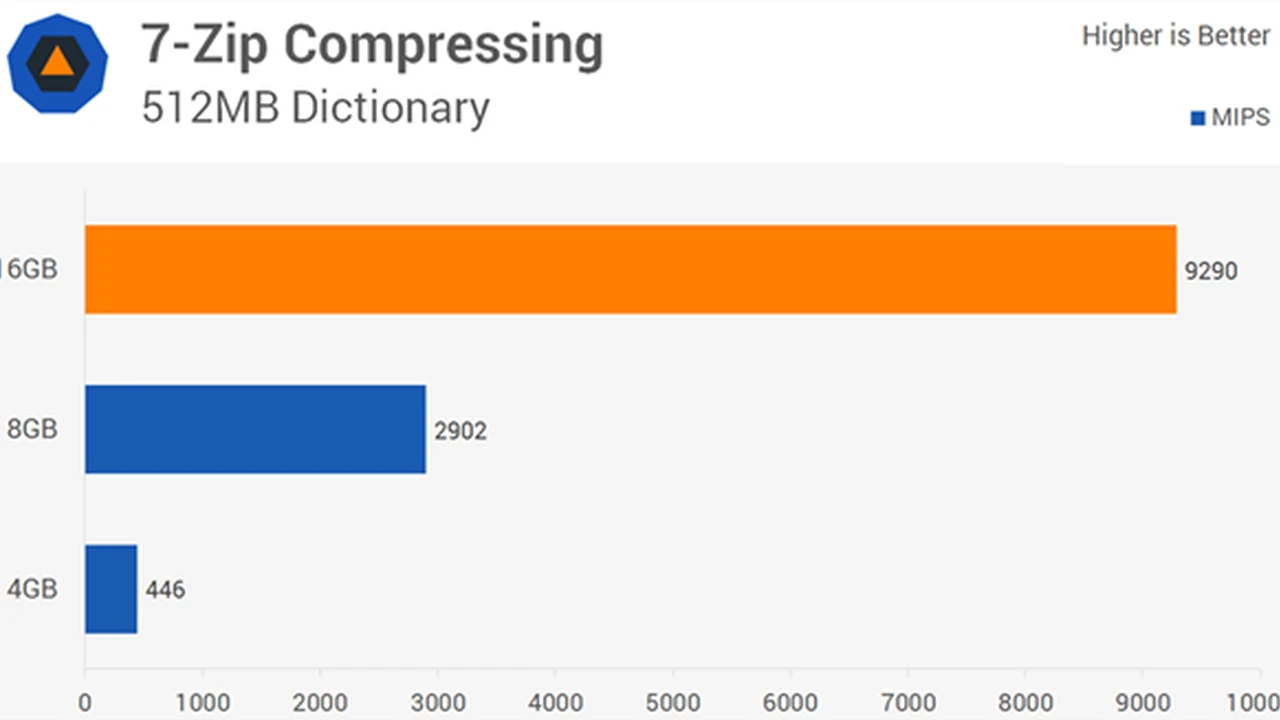
Most academic tasks, like word processing, web browsing, and creating presentations, aren't particularly demanding. An Intel Core i3 or i5 processor, or an AMD Ryzen 3 or 5, coupled with 8GB of RAM, is usually more than sufficient. If you're in a STEM field or pursuing graphic design, you might need a Core i7/Ryzen 7 and 16GB RAM, possibly with a dedicated GPU.
Portability and Design for Campus Life
Weight and size are crucial. A laptop weighing less than 3 pounds (1.36 kg) is ideal for carrying in a backpack all day. Screen size typically ranges from 13 to 14 inches, offering a good balance between screen real estate and portability. Look for slim designs and durable builds that can withstand the occasional bump.
Battery Life for All Day Learning
No one wants to hunt for an outlet between classes. Aim for a laptop that offers at least 8-10 hours of real-world battery life. This ensures you can get through lectures, study sessions, and even some leisure time without constantly worrying about power.
Storage Options for Student Files
An SSD (Solid State Drive) is a must for speed and durability. A 256GB SSD is a good starting point for most students, providing enough space for the operating system, essential software, and plenty of documents. If you deal with large media files or numerous applications, consider 512GB.
Budget Friendly Student Laptop Recommendations
* Acer Aspire 5
* Description: A fantastic all-rounder for students on a budget. It offers solid performance for everyday tasks, a decent display, and a comfortable keyboard. It's not the lightest, but it's very capable for its price.
* Key Features: Intel Core i5/AMD Ryzen 5, 8GB RAM, 256GB/512GB SSD, 15.6-inch Full HD display.
* Use Case: General studies, essay writing, online research, casual media consumption.
* Price Range: $400 - $700
* Lenovo IdeaPad Flex 5
* Description: A versatile 2-in-1 convertible laptop that can switch between laptop, tablet, tent, and stand modes. Great for note-taking with a stylus (often sold separately) and presentations.
* Key Features: AMD Ryzen 5/7, 8GB/16GB RAM, 256GB/512GB SSD, 14-inch Full HD touchscreen.
* Use Case: Interactive learning, digital note-taking, light creative work, media viewing.
* Price Range: $600 - $900
* Apple MacBook Air M1
* Description: While a higher price point, the M1 MacBook Air offers unparalleled battery life, silent operation (fanless design), and excellent performance for its class. It's incredibly portable and has a premium build.
* Key Features: Apple M1 chip, 8GB/16GB RAM, 256GB/512GB SSD, 13.3-inch Retina display.
* Use Case: Students who value long battery life, premium build, and seamless integration with the Apple ecosystem. Great for general studies and light creative tasks.
* Price Range: $800 - $1100 (often found on sale)
Key Considerations for Professionals Power Security Connectivity
Professionals often require more robust machines that can handle intensive applications, ensure data security, and offer seamless connectivity for remote work or client presentations. Reliability and durability are also paramount, as downtime can be costly.
Processing Power for Demanding Applications
For professionals, especially those in fields like video editing, data analysis, software development, or CAD, a powerful processor is non-negotiable. Look for Intel Core i7 or i9, or AMD Ryzen 7 or 9. 16GB of RAM is a minimum, with 32GB or even 64GB being beneficial for heavy multitasking or specialized software. A dedicated GPU (NVIDIA GeForce RTX or AMD Radeon RX) is essential for graphic-intensive tasks.
Security Features for Business Data
Data security is critical. Features like fingerprint readers, facial recognition (Windows Hello), TPM 2.0 chips, and robust encryption capabilities are highly desirable. Many business-oriented laptops also come with advanced management features for IT departments.
Connectivity and Ports for Peripherals
Professionals often connect to external monitors, projectors, and various peripherals. A good selection of ports, including USB-A, USB-C (Thunderbolt 3 or 4 is a huge plus for fast data transfer and external GPU support), HDMI, and an SD card reader, is important. Ethernet ports are also valuable for stable network connections.
Display Quality for Visual Work
For designers, video editors, or anyone who spends hours looking at a screen, a high-resolution display (QHD or 4K) with excellent color accuracy (e.g., 100% sRGB or DCI-P3 coverage) is crucial. Matte finishes can reduce glare, which is beneficial in various lighting conditions.
Build Quality and Durability for Travel
Business travel can be tough on electronics. Look for laptops with military-grade durability certifications (MIL-STD-810G/H) and premium materials like aluminum or magnesium alloy. A spill-resistant keyboard is also a nice bonus.
Premium Professional Laptop Recommendations
* Dell XPS 15/17
* Description: Widely regarded as one of the best Windows laptops for professionals. It combines stunning design, powerful performance, and a gorgeous InfinityEdge display. Excellent for creative professionals and power users.
* Key Features: Intel Core i7/i9, up to 64GB RAM, up to 2TB SSD, NVIDIA GeForce RTX GPU options, 15.6-inch or 17-inch Full HD+/4K+ display.
* Use Case: Video editing, graphic design, software development, heavy multitasking, general business use.
* Price Range: $1500 - $3000+
* Lenovo ThinkPad X1 Carbon Gen 11
* Description: The gold standard for business laptops. Known for its legendary keyboard, robust security features, and exceptional durability. It's incredibly lightweight for its capabilities.
* Key Features: Intel Core i5/i7, up to 32GB RAM, up to 1TB SSD, 14-inch Full HD/2.8K OLED display.
* Use Case: Corporate professionals, frequent travelers, anyone needing a reliable, secure, and comfortable typing experience for long hours.
* Price Range: $1300 - $2500
* Apple MacBook Pro 14-inch/16-inch (M2 Pro/Max)
* Description: For creative professionals, the MacBook Pro with Apple's M2 Pro or M2 Max chips offers unparalleled performance for video editing, 3D rendering, and music production. It boasts incredible battery life and a stunning Liquid Retina XDR display.
* Key Features: Apple M2 Pro/Max chip, up to 96GB unified memory, up to 8TB SSD, 14.2-inch or 16.2-inch Liquid Retina XDR display.
* Use Case: Video editors, music producers, graphic designers, software developers, and anyone requiring top-tier performance for creative and demanding tasks.
* Price Range: $1999 - $4000+
Hybrid Users and Versatile Laptop Options
What if you're a student who also freelances, or a professional who needs a lighter machine for personal use? Many laptops bridge the gap, offering a blend of features that cater to both worlds.
2-in-1 Convertibles for Flexibility
Laptops like the Microsoft Surface Laptop Studio or HP Spectre x360 offer the versatility of a tablet with the power of a laptop. They're great for presentations, digital art, and note-taking, while still being capable productivity machines.
Mid-Range Performance and Portability
These laptops strike a balance between power and portability. They might not have the absolute top-tier processors or dedicated GPUs, but they offer excellent performance for most tasks, good battery life, and a manageable weight.
Hybrid Laptop Recommendations
* HP Spectre x360 14
* Description: A beautifully designed 2-in-1 convertible with a premium feel, excellent OLED display options, and solid performance. It's versatile enough for both creative and productivity tasks.
* Key Features: Intel Core i5/i7, 8GB/16GB RAM, 256GB/512GB SSD, 13.5-inch Full HD+/OLED display.
* Use Case: Students who need a versatile device for note-taking and media, or professionals who appreciate a stylish, flexible laptop for presentations and light creative work.
* Price Range: $1200 - $1800
* Microsoft Surface Laptop 5
* Description: A sleek and lightweight clamshell laptop with a fantastic keyboard and a vibrant touchscreen. It offers a clean Windows experience and good performance for everyday tasks.
* Key Features: Intel Core i5/i7, 8GB/16GB RAM, 256GB/512GB SSD, 13.5-inch or 15-inch PixelSense touchscreen.
* Use Case: Users who prioritize design, portability, and a great typing experience for general productivity and media consumption.
* Price Range: $1000 - $1600
Operating Systems Windows macOS ChromeOS
Your choice of operating system significantly impacts your laptop experience. Each has its strengths and weaknesses.
Windows The Versatile Choice
Windows is the most widely used operating system, offering the broadest software compatibility and hardware options. It's highly customizable and suitable for a vast range of tasks, from gaming to professional applications. However, it can sometimes be prone to more security vulnerabilities than macOS.
macOS The Creative Powerhouse
macOS is known for its intuitive user interface, strong security features, and excellent performance, especially with Apple's M-series chips. It's a favorite among creative professionals due to its optimized software for video editing, graphic design, and music production. The hardware options are limited to Apple's own devices, which tend to be more expensive.
ChromeOS The Cloud Centric Solution
ChromeOS is a lightweight, cloud-based operating system primarily designed for web browsing and online applications. Chromebooks are generally more affordable, have excellent battery life, and are very secure. They are ideal for students or users who primarily work within a web browser and don't need powerful desktop applications. They might not be suitable for demanding software or extensive offline work.
Understanding Laptop Specifications What Do They Mean
Navigating laptop specs can feel like learning a new language. Here's a quick breakdown of the most important terms:
CPU Processor The Brain
This is the central processing unit, responsible for executing instructions. Intel's Core i3/i5/i7/i9 and AMD's Ryzen 3/5/7/9 are common. Higher numbers generally mean better performance. For professionals, look for H-series (high performance) or P-series (performance) processors. For students, U-series (ultra-low power) is common.
RAM Random Access Memory Short Term Memory
RAM is where your computer temporarily stores data that it's actively using. More RAM means you can run more applications simultaneously without slowdowns. 8GB is a good minimum, 16GB is ideal for most, and 32GB+ for power users.
Storage SSD vs HDD Long Term Memory
* SSD (Solid State Drive): Faster, more durable, and more expensive. Essential for quick boot times and application loading. Most modern laptops use SSDs.
* HDD (Hard Disk Drive): Slower, cheaper, and more prone to damage. Rarely found in new laptops, but common in older or very budget-friendly models.
GPU Graphics Processing Unit Visual Powerhouse
* Integrated GPU: Built into the CPU, suitable for everyday tasks, streaming, and light gaming. (e.g., Intel Iris Xe, AMD Radeon Graphics).
* Dedicated GPU: A separate chip with its own memory, essential for gaming, video editing, 3D rendering, and other graphic-intensive tasks. (e.g., NVIDIA GeForce RTX, AMD Radeon RX).
Display Resolution and Panel Type
* Resolution: Measured in pixels (e.g., 1920x1080 Full HD, 2560x1600 QHD, 3840x2160 4K). Higher resolution means sharper images.
* Panel Type: IPS (good viewing angles and color accuracy), OLED (vibrant colors, true blacks, excellent contrast), TN (fast response times, often found in gaming laptops, but poorer viewing angles).
Battery Life Measured in Hours
This indicates how long the laptop can run on a single charge. Real-world usage often differs from manufacturer claims, so look for reviews that test actual battery life.
Making Your Final Laptop Decision
Choosing the right laptop is a personal journey. Start by clearly defining your primary use cases. Are you writing essays and browsing the web, or are you editing 4K video and running complex simulations? Once you have a clear picture of your needs, set a realistic budget. Remember that a slightly higher initial investment can often lead to a laptop that lasts longer and performs better, saving you money in the long run.
Don't forget to read reviews from reputable tech sites and watch video reviews to get a sense of real-world performance and user experience. Pay attention to details like keyboard comfort, trackpad responsiveness, and fan noise. Finally, consider the ecosystem you're already in – if you have an iPhone, a MacBook might offer better synergy. If you're deeply invested in Android, a Windows laptop might feel more familiar.
Ultimately, the best laptop for you is the one that empowers you to achieve your academic goals or professional aspirations efficiently and comfortably. Happy hunting!
:max_bytes(150000):strip_icc()/277019-baked-pork-chops-with-cream-of-mushroom-soup-DDMFS-beauty-4x3-BG-7505-5762b731cf30447d9cbbbbbf387beafa.jpg)