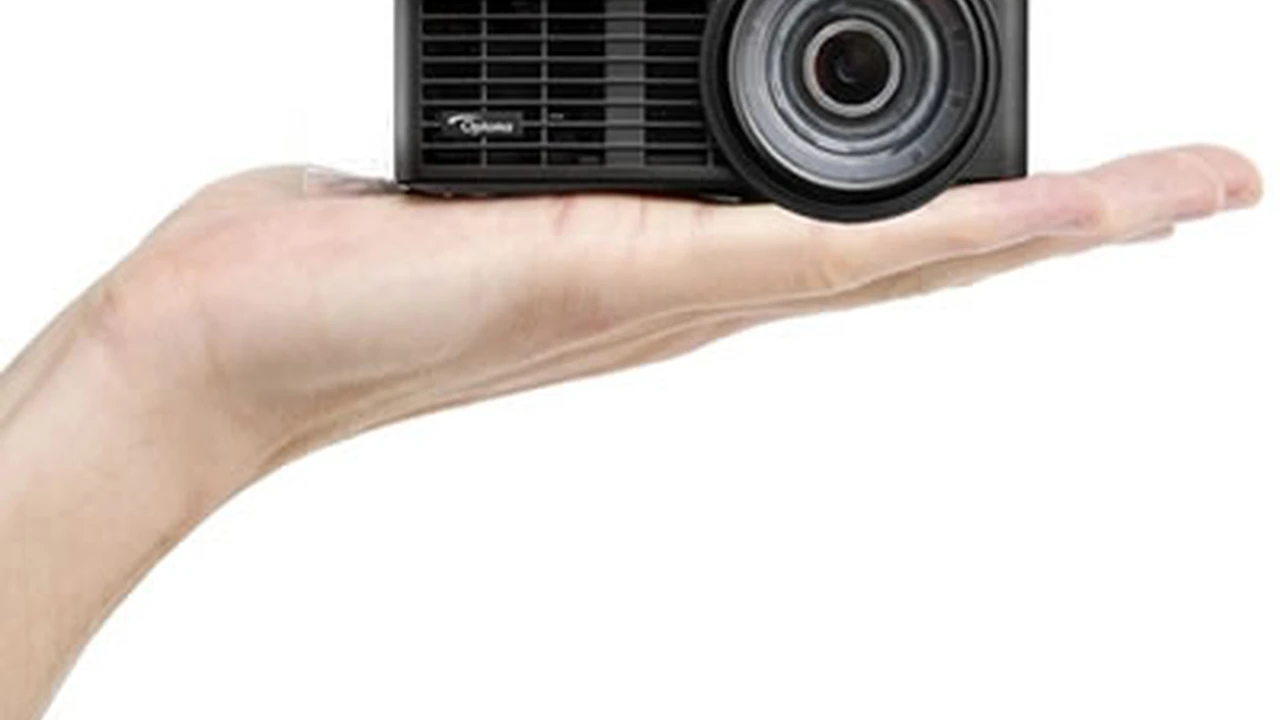
Comparing Portable Projectors for Home Entertainment
The Rise of Portable Projectors and Why You Need One
Hey there, movie buffs and gaming enthusiasts! Ever dreamt of having a massive screen for your favorite flicks or epic gaming sessions, but without the hassle of a fixed, bulky setup? Well, portable projectors are here to make that dream a reality. These compact powerhouses are changing the game for home entertainment, offering incredible flexibility and surprisingly good performance. Forget about being tied to your living room TV; with a portable projector, your backyard, a friend's place, or even a camping trip can become your personal cinema. They're super versatile, easy to set up, and perfect for spontaneous movie nights or showing off your latest vacation photos on a grand scale. We're talking about devices that fit in your backpack but can project an image well over 100 inches. How cool is that?
The appeal of portable projectors isn't just about size; it's about freedom. Imagine hosting an outdoor movie night under the stars, projecting a game onto a garage door for a block party, or even using it for a quick presentation on the go. They're also a fantastic alternative for smaller living spaces where a huge TV might not be practical. Plus, many come with built-in smart features, meaning you can stream directly from your favorite apps without needing extra devices. It's all about convenience and creating memorable experiences wherever you are.
Key Features to Look For in Portable Projectors
Alright, so you're convinced a portable projector is for you. But with so many options out there, how do you pick the right one? Let's break down the crucial features you should keep an eye on. Understanding these will help you make an informed decision and ensure you get the best bang for your buck.
Brightness Lumens and Your Viewing Environment
Brightness, measured in lumens, is super important. Think of it this way: the more lumens, the brighter the image. For a truly portable projector, you're generally looking at anywhere from 100 to 1000 ANSI lumens. If you plan on using your projector mostly in dark rooms or at night, a lower lumen count might be fine. But if you want to use it in a room with some ambient light, or especially outdoors before it gets completely dark, you'll want something on the higher end of that spectrum. Don't get fooled by 'LED lumens' or 'light source lumens' – always look for ANSI lumens for an accurate comparison. A projector with 500 ANSI lumens will give you a decent picture in a moderately lit room, while 800+ ANSI lumens will start to shine even with some daylight around.
Resolution Picture Clarity and Detail
Resolution determines how sharp and detailed your projected image will be. Just like with TVs, higher resolution means a clearer picture. For portable projectors, you'll commonly find options ranging from 480p (standard definition) up to 1080p (Full HD). Some premium models might even offer 4K support, though true native 4K in a portable form factor is still quite rare and expensive. For casual viewing, 720p is often a good balance of quality and price. If you're a stickler for detail and want to watch movies or play games in crisp Full HD, then 1080p is definitely the way to go. Keep in mind that projecting a lower resolution image onto a very large screen can make it appear pixelated, so match your resolution to your intended screen size.
Connectivity Options Wired and Wireless Freedom
How will you connect your devices to the projector? This is where connectivity comes in. Most portable projectors will have at least one HDMI port, which is essential for connecting laptops, gaming consoles, Blu-ray players, and streaming sticks. USB ports are also common for playing media directly from a flash drive or for powering external devices. But here's where portable projectors really shine: wireless connectivity. Look for models with built-in Wi-Fi and Bluetooth. Wi-Fi allows you to stream content directly from apps like Netflix, Hulu, or YouTube, and also enables screen mirroring from your smartphone or tablet. Bluetooth is great for connecting external speakers or headphones, giving you a much better audio experience than the often small built-in speakers. Some even have USB-C for modern device compatibility.
Battery Life Portability Without Power Outlets
Since we're talking 'portable,' battery life is a big deal. What's the point of taking your projector camping if it dies halfway through the movie? Most portable projectors offer anywhere from 1.5 to 3 hours of battery life on a single charge. If you're planning on watching a full-length movie or two, aim for something closer to the 2.5-3 hour mark. Keep in mind that using the projector at maximum brightness or with Wi-Fi streaming will drain the battery faster. Some projectors also double as power banks, which can be a handy feature for charging your phone in a pinch.
Audio Quality Built-in Speakers and External Options
Let's be real, the built-in speakers on most portable projectors aren't going to blow you away. They're usually small and designed for convenience rather than booming sound. However, some higher-end models do offer surprisingly decent audio. The real magic happens when you connect external speakers. Look for Bluetooth connectivity to easily pair with a portable Bluetooth speaker, or an audio output jack (3.5mm) if you prefer wired connections. For the best cinematic experience, external audio is almost always a must.
Smart Features and Operating Systems Streamlining Your Entertainment
Many modern portable projectors come with smart features, essentially turning them into an all-in-one entertainment hub. This often means they run on an Android-based operating system, giving you access to an app store where you can download streaming services like Netflix, Amazon Prime Video, Disney+, and more. This eliminates the need for external streaming sticks, making the setup even simpler. Look for a user-friendly interface and regular software updates to ensure compatibility with new apps and features. Some even have voice control capabilities, which is pretty neat.
Top Portable Projector Recommendations for Different Needs
Okay, now that you know what to look for, let's dive into some specific product recommendations. I've picked a few popular and highly-rated models that cater to different budgets and use cases. Remember, prices can fluctuate, so always check the latest deals!
For the Casual Movie Watcher and Budget Conscious: Anker Nebula Capsule II
Price Range: $350 - $450
The Anker Nebula Capsule II is a fantastic all-rounder, especially if you're looking for something truly portable and easy to use. It's shaped like a soda can, making it incredibly compact. It projects at 720p resolution with 200 ANSI lumens, which is perfectly adequate for dark room viewing or outdoor movie nights after sunset. What really sets it apart is its Android TV 9.0 operating system, giving you direct access to a ton of streaming apps. It also boasts a surprisingly good 8W speaker for its size, and a decent 2.5-hour battery life. Connectivity includes HDMI, USB-A, USB-C, and Bluetooth. It's super user-friendly with automatic keystone correction and autofocus, so setup is a breeze. This is a great choice for backyard movie nights, camping trips, or just projecting a quick show on your bedroom ceiling.
Use Case: Backyard movie nights, camping, bedroom ceiling projection, casual gaming, travel.
Pros: Extremely portable, excellent Android TV integration, decent built-in speaker, easy setup, good battery life for its size.
Cons: 720p resolution might not be sharp enough for some, 200 ANSI lumens requires a dark environment.
For the Home Entertainment Enthusiast Seeking Quality: XGIMI Halo+
Price Range: $750 - $900
If you're willing to spend a bit more for a significant jump in quality, the XGIMI Halo+ is a serious contender. This projector delivers a crisp 1080p Full HD resolution and a bright 900 ANSI lumens, meaning you can get a clear, vibrant image even in rooms with some ambient light. It runs on Android TV 10.0, offering a smooth smart TV experience with access to all your favorite apps. The built-in Harman Kardon speakers provide excellent audio for a portable device, and its 2-hour battery life is sufficient for most movies. It also features advanced autofocus and keystone correction, making setup incredibly fast and hassle-free. This is a great option for those who want a near-home-theater experience in a portable package, perfect for larger gatherings or more discerning viewers.
Use Case: Outdoor movie nights with some ambient light, larger screen projections, gaming, home theater alternative, presentations.
Pros: Full HD 1080p resolution, very bright 900 ANSI lumens, excellent Harman Kardon speakers, fast autofocus and keystone correction, robust build quality.
Cons: Higher price point, battery life could be longer for some users.
For the Ultra-Portable and Minimalist: AAXA P7 Mini HD Projector
Price Range: $300 - $400
The AAXA P7 Mini HD Projector is for those who prioritize extreme portability without sacrificing too much on resolution. It's incredibly small, fitting easily into a pocket, yet it projects a native 1080p resolution image at 600 LED lumens (which translates to around 300-400 ANSI lumens, depending on the source). It doesn't have a built-in smart OS, so you'll need to connect a streaming stick (like a Roku or Fire TV Stick) via its HDMI port, or play media directly from a USB drive or microSD card. Its battery lasts about 90 minutes, which is enough for a quick movie or presentation. This is a no-frills, highly portable option for those who already have their streaming devices and just need a compact projector for occasional use.
Use Case: Business presentations on the go, quick movie nights, travel, connecting to existing streaming sticks.
Pros: Extremely compact, native 1080p resolution, good brightness for its size, versatile input options.
Cons: No built-in smart OS (requires external streaming device), shorter battery life, basic built-in speaker.
For the Premium Experience and Smart Home Integration: Samsung The Freestyle
Price Range: $600 - $800
Samsung's The Freestyle is less of a traditional projector and more of a lifestyle device. It's designed to be incredibly versatile, with a unique cradle stand that allows it to project at almost any angle – on a wall, ceiling, or even the floor. It projects at 1080p resolution with 550 LED lumens (around 230 ANSI lumens), making it suitable for darker environments. What truly sets it apart is its full Samsung Smart TV experience built-in, giving you access to all your favorite apps and Bixby/Alexa voice control. It also has a powerful 360-degree speaker. While its battery is optional (sold separately, or you can use a USB-PD power bank), its smart features, auto-leveling, auto-focus, and auto-keystone make it incredibly easy to set up anywhere. It's perfect for those who want a premium, stylish, and highly integrated smart projector experience.
Use Case: Stylish home entertainment, ceiling projection, smart home integration, casual outdoor use (with optional battery), unique viewing angles.
Pros: Unique design and versatile projection angles, full Samsung Smart TV OS, excellent 360-degree audio, advanced auto-correction features, premium feel.
Cons: Lower brightness compared to some competitors, battery pack is an additional purchase, higher price point.
Setting Up Your Portable Projector for the Best Experience
So you've got your portable projector, now what? Getting the best picture and sound isn't just about the hardware; it's also about how you set it up. Here are some tips to maximize your portable cinema experience.
Screen Surface and Size Maximizing Your Image
While you can project onto any flat, light-colored surface, a dedicated projector screen will always give you the best results. Screens are designed to reflect light evenly and enhance contrast, making your image pop. If a screen isn't an option, a smooth, white wall is your next best bet. Avoid textured walls or colored surfaces, as they'll distort the image and colors. As for size, most portable projectors can project images from 30 inches up to 100-120 inches or even more. The ideal size depends on your viewing distance and the projector's brightness and resolution. A general rule of thumb is that the viewing distance should be about 1.5 to 2 times the screen height. Don't try to project too large an image if your projector isn't bright enough, as it will look washed out.
Lighting Conditions The Darker the Better
This is probably the most critical factor for any projector, especially portable ones with lower lumen counts. The darker your viewing environment, the better your projected image will look. Close curtains, turn off lights, and wait until after sunset for outdoor viewing. Even a small amount of ambient light can significantly wash out the colors and contrast of your image. If you absolutely must use it in a brighter room, consider a projector with higher ANSI lumens or a special ambient light rejecting (ALR) screen, though ALR screens are usually more expensive and less portable.
Audio Enhancement Connecting External Speakers
As mentioned before, the built-in speakers on portable projectors are often just 'okay.' For a truly immersive experience, you'll want to connect external audio. The easiest way is via Bluetooth to a portable Bluetooth speaker. Brands like JBL, Ultimate Ears, or even Anker Soundcore offer fantastic portable speakers that can dramatically improve your sound. If your projector has a 3.5mm audio jack, you can connect wired speakers or even a soundbar. For a full cinematic feel, a good sound system makes all the difference.
Placement and Keystone Correction Getting a Straight Image
Ideally, you want to place your projector directly in front of the screen, perpendicular to it. This gives you the most natural, rectangular image. However, with portable projectors, this isn't always possible. That's where keystone correction comes in. This feature allows the projector to digitally correct a distorted image (like a trapezoid shape) back into a rectangle if the projector is placed at an angle. Most portable projectors have automatic vertical keystone correction, and some even offer automatic horizontal correction. While convenient, remember that digital keystone correction can slightly reduce image quality, so try to position the projector as straight as possible first.
Powering Your Projector Keeping the Fun Going
For longer viewing sessions, especially outdoors, you'll want to consider external power. If you're near an outlet, great! Otherwise, a powerful USB-PD (Power Delivery) power bank can extend your projector's battery life significantly. Check your projector's specifications for its power input requirements to ensure compatibility with your power bank. Some projectors even have a DC input for a dedicated power adapter. Always make sure you have enough juice for your entire movie or gaming session to avoid disappointment.
Portable Projectors Beyond Movies and Gaming
While movies and gaming are the most obvious uses, portable projectors are surprisingly versatile tools that can enhance various aspects of your life. Let's explore some other cool ways you can use these compact devices.
Educational Tool and Presentation Aid Learning and Sharing
For students, teachers, or business professionals, a portable projector can be an invaluable asset. Imagine giving a presentation without needing to find a TV or a fixed projector in a meeting room. You can project slides, documents, or videos directly from your laptop or even a USB drive. For kids, it can turn learning into an interactive experience, projecting educational games or documentaries onto a wall. It's a fantastic way to make learning more engaging and presentations more impactful, whether in a classroom, a small office, or even a coffee shop.
Art and Craft Assistant Tracing and Decorating
Are you into art or DIY projects? A portable projector can be your secret weapon. Project an image onto a canvas, wall, or piece of furniture, and then trace it for perfect proportions. This is great for murals, painting intricate designs, or even transferring patterns for sewing or woodworking. You can also use it to project festive images onto your house for holiday decorations, creating a dynamic and unique display without the hassle of stringing up countless lights.
Virtual Window and Ambiance Creator Setting the Mood
Want to transform your living space? Project calming nature scenes, cityscapes, or even a crackling fireplace onto a blank wall to create an instant ambiance. There are tons of 'virtual window' videos available online that can make a small room feel more open and inviting. It's a unique way to set the mood for a party, a relaxing evening, or even just to add a touch of visual interest to your home decor.
Fitness and Workout Companion Interactive Exercise
Take your home workouts to the next level. Project fitness videos, yoga classes, or even virtual cycling routes onto a large wall. This gives you a much more immersive experience than watching on a small tablet or phone screen, making it easier to follow along and stay motivated. It's like having a personal trainer projected life-size in your living room.
Digital Art Display and Photo Slideshows Showcasing Memories
Instead of just looking at photos on a small screen, project your vacation slideshows or family albums onto a large wall for everyone to enjoy. It turns a simple photo viewing into a shared experience. You can also use it to display digital art, turning your wall into a dynamic gallery. It's a fantastic way to relive memories or showcase your creative side.
Common Questions About Portable Projectors Answered
Still have some lingering questions? Let's tackle a few common ones that pop up when people are considering a portable projector.
Can I use a portable projector during the day?
Generally, it's challenging. Most portable projectors aren't bright enough to compete with direct daylight. You'll get the best results in a completely dark room or outdoors after sunset. If you absolutely need to use it during the day, look for models with 800+ ANSI lumens and consider using an ambient light rejecting (ALR) screen, which helps to absorb ambient light and enhance the projected image.
How long do portable projector bulbs last?
Unlike traditional lamp-based projectors, most portable projectors use LED light sources. LEDs have a much longer lifespan, typically rated for 20,000 to 30,000 hours or even more. This means you likely won't ever need to replace the 'bulb' during the projector's lifetime, which is a huge advantage in terms of maintenance and cost.
Can I connect my phone to a portable projector?
Absolutely! Most modern portable projectors offer multiple ways to connect your phone. The easiest is often via Wi-Fi for screen mirroring (AirPlay for iOS, Miracast for Android). Many also have HDMI ports, so you can use an HDMI adapter for your phone (e.g., Lightning to HDMI for iPhones, USB-C to HDMI for Android). Some even have USB-C ports that support video output directly.
Are portable projectors good for gaming?
Yes, they can be! For casual gaming, they're fantastic for creating a huge, immersive screen. For competitive gaming, you'll want to pay attention to input lag. While most portable projectors aren't designed for ultra-low input lag like dedicated gaming monitors, many offer a perfectly acceptable experience for most games. Look for models that mention a 'game mode' or low input lag in their specifications if gaming is a primary use case for you.
What's the difference between ANSI lumens and LED lumens?
This is a common point of confusion. ANSI lumens is a standardized measurement of brightness, providing a consistent way to compare projectors. LED lumens, on the other hand, is a marketing term that often inflates the perceived brightness. LED lumens typically appear much higher than their ANSI lumen equivalent (e.g., 1000 LED lumens might only be 200-300 ANSI lumens). Always look for ANSI lumens when comparing brightness to get an accurate idea of real-world performance.
Do portable projectors have built-in streaming apps?
Many do! A lot of portable projectors run on an Android-based operating system (like Android TV), which allows you to download and use popular streaming apps such as Netflix, Hulu, Amazon Prime Video, Disney+, and YouTube directly on the projector. This makes them truly all-in-one entertainment devices, eliminating the need for external streaming sticks.
Making Your Choice The Perfect Portable Projector for You
Choosing the best portable projector really comes down to your specific needs and budget. If you're looking for ultimate portability and ease of use for casual movie nights, something like the Anker Nebula Capsule II is a fantastic choice. If you prioritize image quality and brightness for a more serious home theater experience on the go, the XGIMI Halo+ might be worth the investment. For the minimalist who just needs a compact projector for presentations or occasional use with existing streaming devices, the AAXA P7 Mini HD Projector is a solid pick. And if you want a stylish, smart, and versatile device that integrates seamlessly into your smart home, Samsung's The Freestyle offers a unique proposition.
No matter which one you choose, a portable projector opens up a world of entertainment possibilities. From backyard movie nights to impromptu gaming sessions, or even just creating a cool ambiance in your room, these little gadgets pack a big punch. So go ahead, pick your favorite, and get ready to project some fun into your life!
:max_bytes(150000):strip_icc()/277019-baked-pork-chops-with-cream-of-mushroom-soup-DDMFS-beauty-4x3-BG-7505-5762b731cf30447d9cbbbbbf387beafa.jpg)