Comparing Smart Pens for Digital Note Taking
Hey there, ever found yourself wishing you could bridge the gap between the tactile feel of pen and paper and the endless possibilities of digital organization? Well, smart pens are here to do just that! They're not just fancy styluses; these gadgets are designed to capture your handwritten notes and drawings, converting them into digital files that you can store, search, and share with ease. Whether you're a student trying to keep up with lectures, a professional brainstorming ideas, or an artist sketching on the go, a smart pen can seriously upgrade your note-taking game. But with so many options out there, how do you pick the right one? Let's dive deep into the world of smart pens, comparing some of the best on the market, looking at their features, use cases, and what you can expect to pay.
What are Smart Pens and Why Do You Need One?
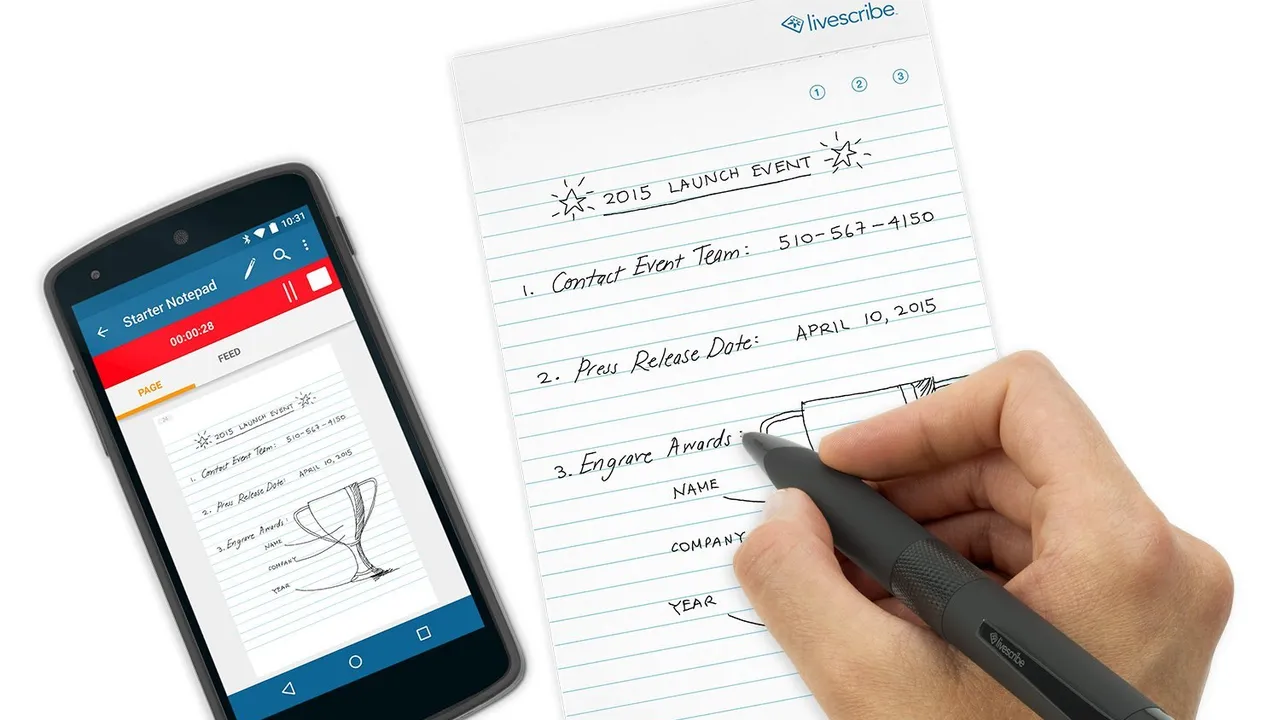
Before we get into the nitty-gritty of specific models, let's clarify what a smart pen actually is. At its core, a smart pen is a writing instrument that digitizes your handwritten content. This usually involves a tiny camera or sensors in the pen that track its movement on special paper, or sometimes, directly on a digital surface. The data is then sent to a connected device – usually your smartphone, tablet, or computer – where it's converted into a digital format. This means your scribbles aren't just static images; they can often be converted into searchable text, edited, organized into notebooks, and shared instantly. Think about it: no more lost notebooks, no more struggling to read your own handwriting from months ago, and instant access to all your notes from anywhere.
Leading Smart Pen Contenders A Detailed Comparison
Alright, let's get to the main event. We've picked out some of the most popular and highly-rated smart pens that offer different approaches to digital note-taking. Each has its strengths and ideal users, so pay close attention to what fits your workflow best.
Livescribe Echo Smartpen The Classic Choice for Students
The Livescribe Echo Smartpen has been a long-standing favorite, especially among students. It's known for its ability to record audio simultaneously with your notes, creating 'pencasts' where you can tap on a word in your notes and hear what was being said at that exact moment. This feature is incredibly powerful for reviewing lectures or meetings.
Key Features of Livescribe Echo Smartpen
- Audio Recording and Playback: This is its killer feature. Sync your notes with audio recordings.
- Special Dot Paper: Requires Livescribe's proprietary dot paper, which is embedded with a unique pattern that the pen's camera reads.
- Handwriting to Text Conversion: Converts your handwritten notes into searchable digital text.
- Connectivity: Connects to your computer via USB for transferring notes and charging.
- Storage: Available in 2GB and 8GB models, storing hundreds of hours of audio and thousands of pages of notes.
Use Cases for Livescribe Echo Smartpen
This pen shines in academic settings. Imagine recording a lecture, taking notes as usual, and then later, if you can't remember what the professor said about a specific point, you just tap on that word in your digital notes, and the audio plays back. It's also great for interviews, brainstorming sessions, or any situation where you need a detailed record of both what was written and what was said.
Pros and Cons of Livescribe Echo Smartpen
- Pros: Excellent audio-syncing feature, reliable handwriting recognition, easy to use.
- Cons: Requires proprietary paper (an ongoing cost), older technology compared to some newer pens, less portable as it needs a computer connection for full functionality.
Pricing and Availability of Livescribe Echo Smartpen
The Livescribe Echo Smartpen typically ranges from $120 to $180 USD, depending on the storage capacity. The dot paper notebooks usually cost around $15-$25 for a pack of four.
Neo Smartpen M1+ and N2 The Sleek and Connected Option
Neo Smartpen offers a more modern approach, focusing on seamless integration with your smartphone or tablet. Their pens, like the M1+ and N2, are designed to feel like regular pens while digitizing your notes in real-time via Bluetooth.
Key Features of Neo Smartpen M1+ and N2
- Real-time Digitization: Notes appear on your connected device as you write.
- Ncode Technology: Uses special Ncode paper, similar to Livescribe's dot paper.
- Cloud Integration: Easily syncs with popular cloud services like Google Drive, Evernote, and Dropbox.
- Handwriting to Text Conversion: Converts notes into editable text.
- Offline Mode: Can store notes internally and sync later when connected.
- Sleek Design: Designed to look and feel like a regular pen.
Use Cases for Neo Smartpen M1+ and N2
These pens are fantastic for professionals who need to quickly digitize meeting notes, designers sketching ideas, or anyone who prefers the feel of traditional writing but wants the benefits of digital storage and sharing. The real-time syncing is a huge plus for immediate access to your notes on your device.
Pros and Cons of Neo Smartpen M1+ and N2
- Pros: Real-time syncing, good cloud integration, comfortable to hold, offline storage.
- Cons: Still requires proprietary paper, app can sometimes be a bit clunky, battery life could be better on continuous use.
Pricing and Availability of Neo Smartpen M1+ and N2
The Neo Smartpen M1+ usually retails for around $100-$130 USD, while the N2, with its more premium build, is typically in the $150-$180 USD range. Ncode notebooks are comparable in price to Livescribe's dot paper.
Moleskine Pen+ Ellipse The Stylish and Integrated Experience
If you're a fan of Moleskine notebooks, their Pen+ Ellipse smart pen offers a beautifully integrated experience. It works seamlessly with Moleskine's specially designed paper tablets, bringing your analog notes into the digital realm with a touch of classic style.
Key Features of Moleskine Pen+ Ellipse
- Seamless Moleskine Integration: Designed to work perfectly with Moleskine Paper Tablets.
- Real-time Digitization: Notes appear on your connected device as you write.
- Smart Features on Paper: Some Moleskine notebooks have icons on the page that allow you to tag, share, or convert notes directly from the paper.
- Cloud Sync: Integrates with popular cloud services.
- Handwriting to Text: Converts handwritten notes to digital text.
Use Cases for Moleskine Pen+ Ellipse
This is ideal for creatives, writers, and professionals who appreciate the aesthetic and quality of Moleskine products. It's perfect for journaling, sketching, or taking meeting notes in a stylish way, then easily digitizing them for archiving or sharing.
Pros and Cons of Moleskine Pen+ Ellipse
- Pros: Elegant design, excellent integration with Moleskine ecosystem, real-time syncing, intuitive app.
- Cons: Requires Moleskine's specific paper (can be pricier than generic options), less feature-rich than some competitors (e.g., no audio recording).
Pricing and Availability of Moleskine Pen+ Ellipse
The Moleskine Pen+ Ellipse typically costs around $150-$200 USD. Moleskine Paper Tablets are usually priced higher than generic dot paper, ranging from $20-$30 per notebook.
Rocketbook Core and Everlast Pens The Reusable and Eco-Friendly Option
Rocketbook takes a slightly different approach. Instead of just digitizing notes, their system focuses on reusability. You write on special synthetic paper with a Frixion pen, scan your notes with the Rocketbook app, and then wipe the page clean with a damp cloth to reuse it. The pen itself isn't 'smart' in the traditional sense, but the system as a whole is incredibly clever.
Key Features of Rocketbook Core and Everlast Pens
- Reusable Pages: Write, scan, wipe clean, and reuse.
- Cloud Integration: Smart 'beacons' on the page allow you to send notes to specific cloud destinations (Evernote, Google Drive, Dropbox, email, etc.) with a single mark.
- OCR (Optical Character Recognition): Converts handwriting to text.
- Frixion Pen Compatibility: Uses Pilot Frixion pens, which are widely available.
- Variety of Notebooks: Available in various sizes and formats (lined, dotted, planner).
Use Cases for Rocketbook Core and Everlast Pens
This system is perfect for eco-conscious individuals, students who take a lot of notes and want to reduce paper waste, or anyone who needs a simple, effective way to digitize and organize notes without constantly buying new smart paper. It's also great for quick brainstorming sessions where you might want to erase and start over.
Pros and Cons of Rocketbook Core and Everlast Pens
- Pros: Highly reusable, eco-friendly, affordable, excellent cloud integration, uses readily available pens.
- Cons: Requires a specific type of pen (Frixion), writing experience is different from traditional paper, need to manually wipe pages clean, the pen itself isn't 'smart' – the intelligence is in the app and paper.
Pricing and Availability of Rocketbook Core and Everlast Pens
Rocketbook notebooks are very affordable, with the Core (formerly Everlast) typically costing around $20-$30 USD. A pack of Frixion pens is usually $10-$15. This makes it one of the most budget-friendly long-term solutions.
Wacom Bamboo Folio and Slate The Digital Notepad Experience
Wacom, a leader in digital drawing tablets, also offers smart notepads like the Bamboo Folio and Slate. These devices allow you to write on any paper placed on their surface with a special Wacom pen, and your notes are digitized in real-time.
Key Features of Wacom Bamboo Folio and Slate
- Use Your Own Paper: Unlike other smart pens, you can use any standard paper with these devices.
- Real-time Digitization: Notes appear on your connected device as you write.
- Wacom Inkspace App: Powerful app for organizing, editing, and sharing notes.
- Handwriting to Text Conversion: Converts notes into editable text.
- Layering and Editing: Advanced features for editing digital notes, including adding layers.
Use Cases for Wacom Bamboo Folio and Slate
These are ideal for artists, designers, and professionals who prefer to sketch or write on their own preferred paper but want the flexibility of digital files. The ability to use any paper is a significant advantage, eliminating the need for proprietary notebooks.
Pros and Cons of Wacom Bamboo Folio and Slate
- Pros: Use any paper, excellent digital ink quality, robust app features, good for drawing and sketching.
- Cons: More expensive than just a smart pen, the folio/slate itself adds bulk, requires charging the folio/slate as well as the pen.
Pricing and Availability of Wacom Bamboo Folio and Slate
The Wacom Bamboo Slate typically ranges from $100-$130 USD, while the Bamboo Folio, which includes a cover, is usually around $150-$200 USD.
Factors to Consider When Choosing Your Smart Pen
With all these options, how do you make the final decision? Here are some key factors to weigh:
Paper Requirements Proprietary vs Any Paper
This is a big one. Do you mind buying special dot paper (Livescribe, Neo, Moleskine) or do you prefer the freedom to use any paper (Wacom, Rocketbook's system)? Proprietary paper can be an ongoing cost, but it often ensures more accurate tracking. Rocketbook offers a reusable solution, which is a great middle ground.
Connectivity and Real-time Syncing
Do you need your notes to appear on your device instantly (Neo, Moleskine, Wacom) or are you okay with syncing them later via USB (Livescribe Echo)? Real-time syncing is great for immediate access and sharing, while offline storage is useful if you don't always have your device with you.
Handwriting Recognition and Searchability
Most smart pens offer OCR to convert your handwriting into searchable text. Check reviews for the accuracy of this feature, especially if your handwriting isn't the neatest. The ability to search your notes digitally is a huge time-saver.
Audio Recording Capabilities
If you attend a lot of lectures or meetings, the audio-syncing feature of the Livescribe Echo is a game-changer. No other smart pen currently offers this level of integration between audio and written notes.
App Features and Cloud Integration
The companion app is just as important as the pen itself. Look for an app that's intuitive, offers good organization features (notebooks, tags), and integrates with your preferred cloud services (Evernote, OneNote, Google Drive, Dropbox, etc.) for easy sharing and backup.
Battery Life and Charging
Consider how long the pen lasts on a single charge and how it recharges. Some pens offer longer battery life, which is crucial if you're using it for extended periods away from a power source.
Design and Ergonomics
Since you'll be holding it for long periods, the pen's design, weight, and feel are important. Some smart pens are bulkier than regular pens, while others are designed to be more discreet.
Price and Ongoing Costs
Beyond the initial purchase price of the pen, factor in the cost of proprietary paper (if applicable) and any subscription fees for advanced app features. Rocketbook stands out here for its low ongoing costs.
Beyond the Pen Smart Pen Accessories and Ecosystems
It's not just about the pen; the ecosystem around it can significantly enhance your experience. This includes the type of paper, the companion app, and any additional accessories.
Smart Paper and Notebooks
As we've discussed, most smart pens rely on special paper. Livescribe, Neo, and Moleskine all have their own versions. These papers are embedded with tiny, almost invisible patterns that the pen's camera uses to track its position. While they add an ongoing cost, they are essential for the pen's functionality. Rocketbook's synthetic paper is unique because it's reusable, offering a different kind of value.
Companion Apps and Software
The app is where the magic happens. It's where your notes are stored, organized, converted, and shared. Look for apps that offer:
- Intuitive Interface: Easy to navigate and use.
- Organization Tools: Features like notebooks, tags, and folders to keep your notes tidy.
- Search Functionality: The ability to search your handwritten notes (after OCR).
- Export Options: Exporting notes as PDFs, images, or text files.
- Cloud Sync: Integration with popular cloud storage services.
- Editing Tools: Basic editing capabilities for your digital notes.
Stylus Tips and Refills
Smart pens use standard ink refills, but they also have a special tip that interacts with the paper. Make sure replacement tips and ink refills are readily available and reasonably priced. For Rocketbook, you'll just need to stock up on Pilot Frixion pens.
The Future of Digital Note Taking What's Next for Smart Pens
The smart pen market is constantly evolving. We're seeing trends towards:
- Improved AI and OCR: Even more accurate handwriting recognition, even for messy handwriting.
- Better Cloud Integration: More seamless connections with a wider range of productivity apps.
- Enhanced Drawing Capabilities: More pressure sensitivity and precision for artists and designers.
- Cross-Platform Compatibility: Better support across different operating systems and devices.
- Sustainable Solutions: More emphasis on reusable paper and eco-friendly materials, following Rocketbook's lead.
- Integration with AR/VR: Imagine taking notes in a virtual meeting and having them instantly appear in your real-world notebook.
Ultimately, the best smart pen for you depends on your specific needs, budget, and how you prefer to take notes. Whether you're a student, a professional, or a creative, there's a smart pen out there that can help you bridge the gap between analog and digital, making your note-taking more efficient, organized, and accessible than ever before. Happy writing!
:max_bytes(150000):strip_icc()/277019-baked-pork-chops-with-cream-of-mushroom-soup-DDMFS-beauty-4x3-BG-7505-5762b731cf30447d9cbbbbbf387beafa.jpg)