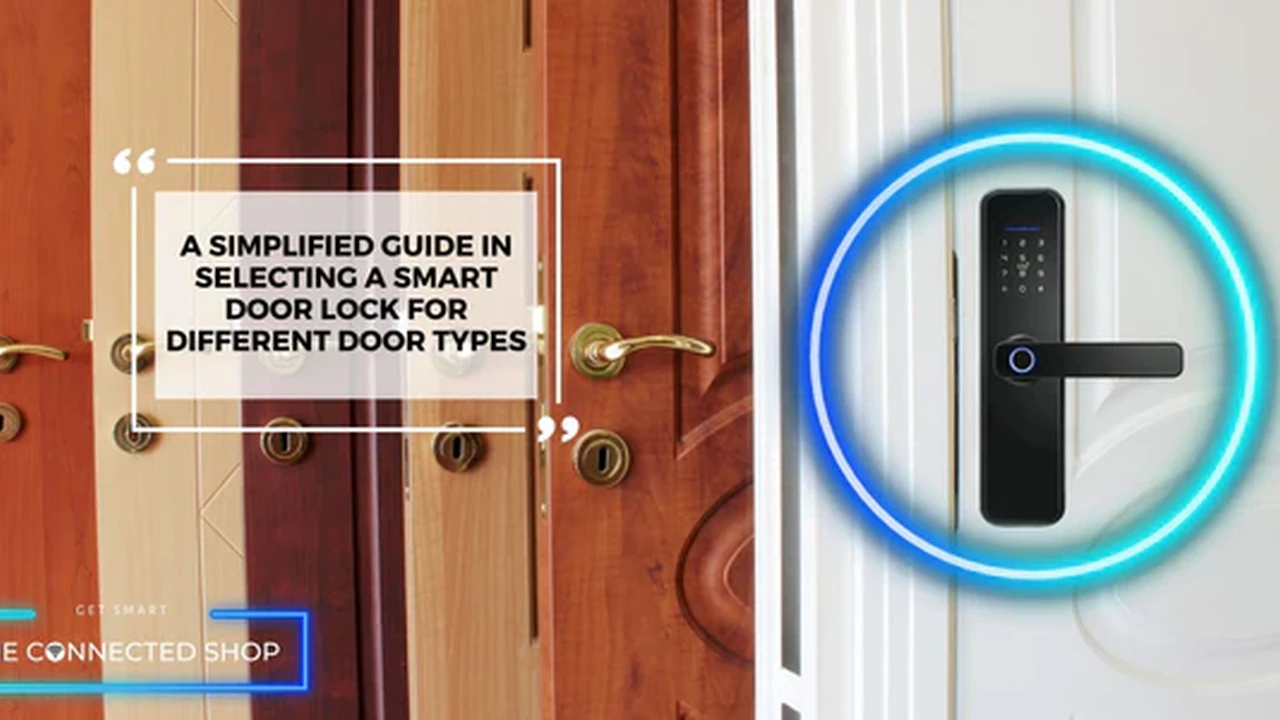
Secure your home with the best smart locks. We review top models for security, convenience, and integration with smart home systems.
The Ultimate Guide to Smart Locks for Your Front Door
Hey there, looking to upgrade your home security? Smart locks are a game-changer, offering not just enhanced protection but also incredible convenience. Imagine never fumbling for keys again, granting access to friends or delivery services remotely, or even having your door automatically lock when you leave. That's the magic of smart locks! But with so many options out there, choosing the right one can feel a bit overwhelming. Don't worry, we're here to break it all down for you, covering everything from different types of locks to specific product recommendations, use cases, and what you can expect to pay.
Understanding Smart Lock Types and Connectivity Options
Before diving into specific products, let's get a handle on the different kinds of smart locks you'll encounter and how they connect to your smart home ecosystem. Knowing this will help you pick a lock that fits your lifestyle and existing tech.
Full Replacement Smart Locks for Enhanced Security
These locks completely replace your existing deadbolt. They often come with a keypad, touchscreen, or even a fingerprint reader on the exterior, and a smart module on the interior. They're generally more secure as they're designed from the ground up as smart devices. Installation can be a bit more involved, but it's usually a straightforward DIY project for anyone comfortable with basic tools.
Retrofit Smart Locks for Easy Installation
If you love your current deadbolt and just want to add smart capabilities, a retrofit smart lock is your go-to. These devices typically attach to the interior side of your existing deadbolt, leaving the exterior untouched. This means you can still use your traditional key if you want to. They're super easy to install, often taking just a few minutes.
Smart Lock Connectivity Bluetooth Wi-Fi Z-Wave and Zigbee
How your smart lock talks to your phone or smart home hub is crucial. Here's a quick rundown:
- Bluetooth: Great for close-range control. You need to be within a certain distance of the lock to operate it. Many locks use Bluetooth for initial setup and local control, often pairing with a Wi-Fi bridge for remote access.
- Wi-Fi: Connects directly to your home Wi-Fi network, allowing for remote control from anywhere with an internet connection. This is super convenient but can be a bit more power-hungry for the lock's batteries.
- Z-Wave and Zigbee: These are mesh networking protocols specifically designed for smart home devices. They require a compatible smart home hub (like SmartThings, Hubitat, or an Alexa Echo Plus) to function. They're known for their reliability, low power consumption, and ability to create a robust network of devices. If you're building a comprehensive smart home, these are excellent choices.
Key Features to Look for in a Smart Lock
When you're shopping for a smart lock, keep these features in mind to ensure you get the best fit for your needs:
Multiple Access Methods for Convenience and Flexibility
The more ways you can unlock your door, the better! Look for locks that offer:
- Keypad/Touchscreen: For entering codes.
- Fingerprint Reader: Super fast and secure biometric access.
- Smartphone App: Control from your phone, whether you're home or away.
- Traditional Key: A good backup in case of battery failure or tech glitches.
- Voice Control: Integration with Alexa, Google Assistant, or Apple HomeKit.
Security and Durability Smart Lock Construction
A smart lock is still a lock, so security is paramount. Look for:
- ANSI/BHMA Grade: This rating indicates the lock's strength and durability. Grade 1 is the highest, offering the best security.
- Anti-Pick and Anti-Bump Features: These protect against common lock-picking techniques.
- Weather Resistance: Especially important for outdoor-facing locks.
Smart Home Integration and Compatibility
Does the lock play nicely with your existing smart home ecosystem? Check for compatibility with:
- Amazon Alexa
- Google Assistant
- Apple HomeKit
- Samsung SmartThings
- IFTTT (If This Then That) for custom automations.
Battery Life and Low Battery Alerts
Smart locks run on batteries, so good battery life is essential. Look for locks that offer:
- Long battery life: Ideally 6 months to a year.
- Low battery warnings: So you're not locked out unexpectedly.
- Emergency power options: Some locks have terminals for a 9V battery to give it a temporary boost if the main batteries die.
Top Smart Lock Recommendations for Different Needs
Alright, let's get to the good stuff! Here are some of our top smart lock picks, catering to various budgets and preferences.
Schlage Encode Plus Smart WiFi Deadbolt The Premium Choice
Overview: The Schlage Encode Plus is a fantastic option for those who want top-tier security, convenience, and seamless integration, especially for Apple HomeKit users. It's a full replacement deadbolt with a sleek touchscreen keypad.
Key Features:
- Apple Home Key Support: This is a huge selling point. You can unlock your door just by tapping your iPhone or Apple Watch to the lock, even if your device's battery is dead (for a few hours).
- Built-in Wi-Fi: No need for an extra bridge for remote access.
- Touchscreen Keypad: Easy to use and backlit for night visibility.
- ANSI/BHMA Grade 1: Highest residential security rating.
- Integration: Works with Apple HomeKit, Amazon Alexa, and Google Assistant.
Use Cases: Perfect for families who want multiple ways to enter, Apple enthusiasts, and anyone who values robust security with modern conveniences. Great for Airbnb hosts who need to manage access remotely.
Estimated Price: $250 - $300 USD
August Wi-Fi Smart Lock 4th Gen The Retrofit King
Overview: If you love your existing deadbolt and want to keep your traditional keys, the August Wi-Fi Smart Lock is your best bet. It's a retrofit lock that installs on the inside of your door, leaving the exterior untouched.
Key Features:
- Easy Installation: Attaches to your existing deadbolt in minutes.
- Built-in Wi-Fi: No separate bridge needed for remote access.
- Auto-Lock and Auto-Unlock: Locks automatically when you leave and unlocks as you approach (geofencing).
- Virtual Keys: Grant temporary or permanent access to guests via the app.
- Integration: Works with Amazon Alexa, Google Assistant, Apple HomeKit, and many others.
Use Cases: Ideal for renters, people who want to maintain the look of their existing door, or those who prefer a quick and easy installation. Excellent for managing access for dog walkers, cleaners, or family members.
Estimated Price: $200 - $250 USD
Yale Assure Lock 2 Smart Lock Versatile and Reliable
Overview: The Yale Assure Lock 2 offers a great balance of features, reliability, and connectivity options. It comes in various configurations, including keypad, touchscreen, and even a version with a traditional keyhole.
Key Features:
- Modular Connectivity: Available with Wi-Fi, Z-Wave, or Apple HomeKit modules, allowing you to choose the best fit for your smart home.
- Sleek Design: Modern and minimalist aesthetics.
- Auto-Lock: Ensures your door is always locked after a set time.
- DoorSense Technology: Tells you if your door is open or closed, not just locked or unlocked.
- Integration: Broad compatibility depending on the module chosen.
Use Cases: A solid choice for almost anyone. Its modular design makes it adaptable to different smart home setups. Great for those who want a reliable lock with a clean look and the flexibility to choose their preferred connectivity.
Estimated Price: $180 - $280 USD (varies by configuration)
Wyze Lock Budget Friendly Smart Lock
Overview: If you're looking for a smart lock that won't break the bank but still offers essential smart features, the Wyze Lock is a fantastic option. It's a retrofit lock that works with your existing deadbolt.
Key Features:
- Affordable Price: One of the most budget-friendly smart locks on the market.
- Easy Installation: Quick and simple to install over your existing deadbolt.
- Auto-Lock and Auto-Unlock: Convenient hands-free operation.
- Door Position Sensor: Knows if your door is open or closed.
- Integration: Works with Amazon Alexa and Google Assistant. Requires the included Wyze Lock Gateway for Wi-Fi connectivity.
Use Cases: Perfect for those on a tight budget, renters, or anyone just dipping their toes into smart home tech. It provides core smart lock functionality without the premium price tag.
Estimated Price: $100 - $130 USD
Level Bolt Invisible Smart Lock Minimalist Design
Overview: The Level Bolt is truly unique because it's completely invisible. It replaces the internal components of your deadbolt, leaving no visible smart lock hardware on either side of your door. It's perfect for those who want smart functionality without altering their door's aesthetics.
Key Features:
- Invisible Design: No visible smart lock components.
- Uses Your Existing Key: You can still use your traditional key.
- Bluetooth and HomeKit (with bridge): Primarily Bluetooth, but a Level Connect bridge (sold separately or included in some bundles) adds Wi-Fi and HomeKit support.
- Guest Access: Share digital keys via the app.
Use Cases: Ideal for design-conscious homeowners, those in historic homes, or anyone who wants the ultimate discreet smart lock. Great for maintaining a traditional look while gaining smart capabilities.
Estimated Price: $200 - $250 USD
Comparing Smart Locks Which One is Right for You
Choosing the best smart lock really comes down to your specific needs and priorities. Let's compare some key aspects:
Installation Ease Retrofit vs Full Replacement
If you're not handy or prefer minimal fuss, retrofit locks like the August Wi-Fi Smart Lock or Wyze Lock are incredibly easy to install. Full replacement locks like the Schlage Encode Plus or Yale Assure Lock 2 require a bit more effort but offer a more integrated look and often higher security ratings.
Connectivity and Smart Home Ecosystem Integration
Are you an Apple HomeKit user? The Schlage Encode Plus with Home Key is a standout. Do you have a Z-Wave or Zigbee hub? The Yale Assure Lock 2 with the appropriate module will fit right in. If you just want simple Wi-Fi control, many locks offer that directly or via a small bridge. Always check compatibility with your existing smart home devices before buying.
Security Features and Durability Ratings
For maximum security, look for locks with an ANSI/BHMA Grade 1 rating, like the Schlage Encode Plus. While all smart locks offer a level of security, some are built tougher than others. Consider the material quality and internal mechanisms.
Budget Considerations Smart Lock Pricing Tiers
Smart locks range from around $100 to $300+. The Wyze Lock is a great entry-level option. Mid-range locks like the August Wi-Fi Smart Lock and Yale Assure Lock 2 offer a good balance of features and price. Premium options like the Schlage Encode Plus provide advanced features and top-tier security.
Real World Scenarios How Smart Locks Enhance Daily Life
It's not just about security; smart locks bring a ton of convenience to your everyday routine. Here are some practical examples:
Never Get Locked Out Again Keyless Entry Solutions
Forgot your keys? No problem! With a smart lock, you can use a keypad code, your smartphone, or even your fingerprint to get in. This is a lifesaver when you're carrying groceries or have kids in tow.
Remote Access for Guests and Deliveries
Have a friend visiting while you're at work? Need to let a cleaner in? You can grant temporary access codes from your phone, no matter where you are. Some services even integrate directly with smart locks for secure package delivery inside your home.
Automated Locking and Unlocking for Peace of Mind
Set your lock to automatically lock after a certain period (e.g., 30 seconds) or when you leave a geofenced area. This eliminates that nagging feeling of wondering if you locked the door. Conversely, some locks can automatically unlock as you approach, making coming home a breeze.
Activity Logs and Notifications for Home Monitoring
Most smart locks provide an activity log, showing you who entered and when. You can also receive notifications on your phone whenever the door is locked or unlocked, giving you peace of mind, especially when kids come home from school.
Installation and Maintenance Tips for Your Smart Lock
Once you've picked your smart lock, getting it set up and keeping it running smoothly is pretty straightforward.
DIY Installation Steps and Tools Needed
Most smart locks are designed for DIY installation. You'll typically need a screwdriver (Phillips head is usually sufficient) and possibly a tape measure. Follow the manufacturer's instructions carefully. Many brands provide excellent video tutorials that walk you through each step.
Battery Replacement and Emergency Power Options
Pay attention to low battery warnings! Most locks will give you plenty of notice. Keep a spare set of batteries on hand. For full replacement locks, some have external terminals where you can temporarily connect a 9V battery to power it up if the internal batteries die completely, allowing you to enter your code and replace them.
Firmware Updates and App Management
Like any smart device, smart locks receive firmware updates that improve performance, add features, and patch security vulnerabilities. Make sure to keep your lock's firmware updated via its companion app. Also, familiarize yourself with the app's features for managing codes, viewing activity, and setting up automations.
The Future of Smart Locks and Home Security
Smart lock technology is constantly evolving. We're seeing more integration with AI for even smarter access control, enhanced biometric options like facial recognition, and even more robust security features. As smart homes become more interconnected, your smart lock will play an even more central role in your overall home security and automation strategy. So, whether you're looking for ultimate convenience, enhanced security, or just a cool tech upgrade, there's a smart lock out there that's perfect for your front door.
:max_bytes(150000):strip_icc()/277019-baked-pork-chops-with-cream-of-mushroom-soup-DDMFS-beauty-4x3-BG-7505-5762b731cf30447d9cbbbbbf387beafa.jpg)