Smart Home Automation Ideas for Beginners
Hey there, future smart home guru! Thinking about dipping your toes into the world of smart home automation but feeling a bit overwhelmed? You're not alone. It can seem like a lot to take in, with all the different devices, platforms, and endless possibilities. But trust me, it's way easier than you think to get started, and the benefits are totally worth it. We're talking about making your life simpler, more convenient, and even saving some energy along the way. This guide is all about giving you some practical, easy-to-implement smart home automation ideas that are perfect for beginners. We'll break down what you need, how to set things up, and even recommend some specific products to get you going. So, let's dive in and make your home a little smarter, one step at a time!
Understanding Smart Home Basics What You Need to Know
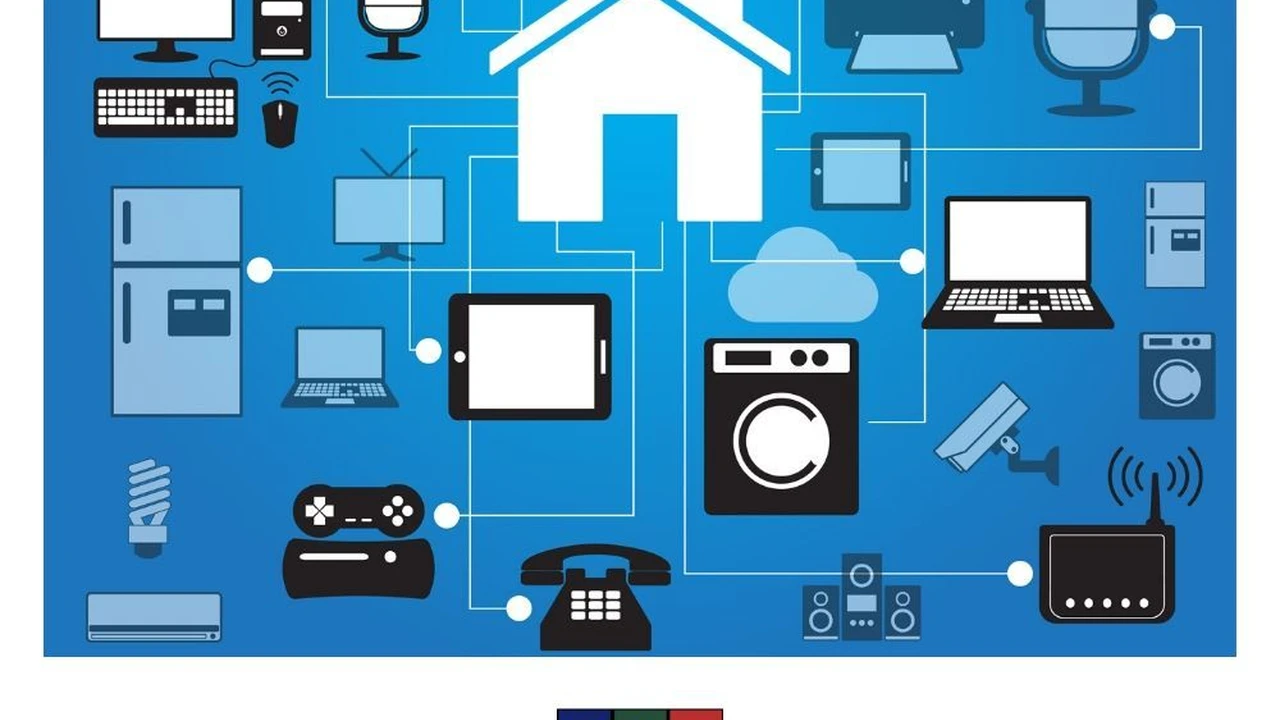
Before we jump into specific automation ideas, let's quickly cover the basics. What exactly is a smart home, and what do you need to make it happen? At its core, a smart home uses connected devices that can communicate with each other and be controlled remotely, often through a central hub, a smartphone app, or even voice commands. Think of it as your home having its own brain, allowing you to automate tasks that you usually do manually.
Smart Home Hubs and Controllers Your Central Command
While many smart devices can work independently, a smart home hub often acts as the brain of your system, allowing different brands and types of devices to communicate seamlessly. This is super important for creating complex automations. Some popular hubs include:
- Amazon Echo (Alexa): More than just a smart speaker, many Echo devices can act as basic smart home hubs, especially for Zigbee devices.
- Google Nest Hub (Google Assistant): Similar to Alexa, Google Nest devices offer voice control and can manage a range of smart devices.
- Samsung SmartThings Hub: A more robust hub that supports a wider variety of protocols (Zigbee, Z-Wave) and allows for more complex automation routines.
- Apple HomePod/Apple TV (HomeKit): If you're an Apple user, these devices can serve as a HomeKit hub, enabling control of HomeKit-compatible accessories.
Recommendation: For beginners, starting with an Amazon Echo Dot (around $30-$50) or Google Nest Mini (around $30-$50) is a great way to get voice control and basic smart home capabilities without a huge investment. If you plan on expanding significantly, a Samsung SmartThings Hub (around $70-$100) offers more flexibility.
Essential Smart Home Devices Where to Start
You don't need to smarten up your entire house overnight. Start with a few key devices that offer immediate convenience and impact. Here are some common starting points:
- Smart Plugs: These are super versatile and affordable. You plug them into a regular outlet, and then plug any 'dumb' appliance into the smart plug, instantly making it smart.
- Smart Light Bulbs: Easy to install and instantly transform your lighting experience with dimming, color changes, and scheduling.
- Smart Thermostats: A bit more of an investment, but they can save you a lot on energy bills by optimizing your heating and cooling.
- Smart Security Cameras: For peace of mind, allowing you to monitor your home remotely.
Easy Smart Home Automation Ideas for Everyday Convenience
Now for the fun part! Let's look at some practical automation ideas that you can set up right away. These are designed to be simple for beginners but offer a significant boost in convenience.
Automating Your Lighting Smart Lighting Scenes and Schedules
Lighting is often the first thing people automate, and for good reason. It's incredibly impactful.
Idea 1: Wake Up with Gentle Light Automation
Instead of a jarring alarm, imagine waking up to lights that gradually brighten, mimicking a sunrise. This is a fantastic way to start your day feeling more refreshed.
- How to set it up: Most smart light apps (like Philips Hue, Sengled, or TP-Link Kasa) allow you to create a 'wake-up' routine. You'll set a start time, an end time (e.g., 30 minutes later), and the lights will slowly increase in brightness.
- Products to consider:
- Philips Hue White and Color Ambiance Starter Kit (around $150-$200): A premium option with excellent color reproduction and reliability. Includes a Hue Bridge, which is a dedicated hub for Hue lights.
- Sengled Smart Wi-Fi LED Bulbs (around $10-$15 per bulb): More budget-friendly, these often connect directly to your Wi-Fi without a separate hub.
- TP-Link Kasa Smart Light Bulbs (around $15-$20 per bulb): Another great hub-free option, known for easy setup and integration with Alexa/Google Assistant.
- Use Case Comparison: Philips Hue offers the most robust ecosystem and advanced features like dynamic scenes, but it's pricier. Sengled and Kasa are excellent for basic scheduling and voice control, perfect for beginners on a budget.
Idea 2: 'Welcome Home' Lighting Automation
Tired of fumbling for light switches when you walk in the door, especially with groceries in hand? Automate your lights to turn on when you arrive.
- How to set it up: This usually involves geofencing (using your phone's location) or a motion sensor.
- Geofencing (via app): In your smart home app (e.g., Google Home, Alexa app, SmartThings), create a routine that triggers when your phone enters a specific geographic area around your home.
- Motion Sensor: Place a smart motion sensor near your entryway. When it detects motion, it triggers the lights.
- Products to consider:
- Smart Plugs (e.g., TP-Link Kasa Smart Plug Mini, around $10-$15): If you have lamps plugged into these, you can automate them.
- Smart Light Bulbs (see above)
- SmartThings Motion Sensor (around $25-$30): Integrates well with the SmartThings ecosystem for reliable motion detection.
- Philips Hue Motion Sensor (around $40-$50): Works seamlessly with Philips Hue lights.
- Use Case Comparison: Geofencing is great for turning on lights before you even open the door. Motion sensors are better for specific areas like a hallway or pantry where you only need light when someone enters.
Idea 3: 'Good Night' Lighting Automation
One command to turn off all the lights in your house? Yes, please! No more going around checking every room.
- How to set it up: Create a 'scene' or 'routine' in your smart home app. You can trigger it with a voice command (e.g., 'Alexa, good night'), a button press, or a set time.
- Products to consider: Any smart lights or smart plugs you have installed.
- Use Case: Perfect for winding down. You can even set some lights to dim slowly over 15 minutes before turning off completely.
Smart Climate Control for Comfort and Savings
Smart thermostats are game-changers for managing your home's temperature efficiently. They learn your preferences and can adjust based on occupancy, weather, and schedules.
Automating Your Thermostat Energy Efficiency and Comfort
Idea 4: Schedule Temperature Adjustments Automation
Set your thermostat to automatically adjust based on your daily schedule. Why heat or cool an empty house?
- How to set it up: Most smart thermostats have intuitive apps where you can create detailed schedules.
- Products to consider:
- Google Nest Thermostat (around $100-$130): Known for its sleek design and learning capabilities. It learns your habits and creates a schedule for you.
- Ecobee Smart Thermostat Premium (around $200-$250): Comes with a remote sensor to detect occupancy and temperature in other rooms, ensuring comfort where you are.
- Honeywell Home T9 Smart Thermostat (around $150-$200): Offers room sensors and geofencing capabilities.
- Use Case Comparison: Nest is great for 'set it and forget it' learning. Ecobee is excellent if you have hot/cold spots in your home and want to prioritize comfort in specific rooms. Honeywell offers a good balance of features and price.
Idea 5: Geofencing for Climate Control Automation
Have your thermostat adjust when you leave and return home, saving energy when you're out and ensuring comfort when you're back.
- How to set it up: Many smart thermostats (like Nest and Ecobee) have built-in geofencing. You enable it in their respective apps.
- Products to consider: Google Nest Thermostat, Ecobee Smart Thermostat Premium, Honeywell Home T9 Smart Thermostat (as listed above).
- Use Case: This is a 'set it and forget it' automation that truly saves energy without you having to think about it.
Enhancing Security and Peace of Mind with Smart Devices
Smart security devices offer an extra layer of protection and allow you to monitor your home from anywhere.
Smart Security Monitoring Automation
Idea 6: Motion-Activated Camera Recording Automation
Get alerts and record footage only when something happens, saving storage space and making it easier to review events.
- How to set it up: Most smart security cameras have this feature built-in. You configure motion detection zones and sensitivity in the camera's app.
- Products to consider:
- Arlo Essential Spotlight Camera (around $100-$130): Wire-free, easy to install, and offers good video quality with a built-in spotlight. Requires a subscription for cloud storage.
- Ring Stick Up Cam Battery (around $100-$130): Another popular wire-free option, integrates well with other Ring devices. Also requires a subscription for video history.
- Wyze Cam v3 (around $30-$40): An incredibly affordable option with surprisingly good features for its price, including local storage via microSD card.
- Use Case Comparison: Arlo and Ring are more robust for outdoor use and offer better integration with their respective ecosystems. Wyze is unbeatable for budget-conscious indoor monitoring.
Idea 7: Smart Doorbell Alerts and Two-Way Talk Automation
See who's at your door, even when you're not home, and communicate with visitors or delivery drivers.
- How to set it up: Install a smart doorbell and connect it to your Wi-Fi. The app will send notifications when someone rings or motion is detected.
- Products to consider:
- Ring Video Doorbell (various models, from $60-$200+): Wide range of options, good app, and integrates with other Ring devices.
- Google Nest Doorbell (Battery) (around $150-$180): Offers excellent image quality and smart alerts (person, package detection).
- Arlo Essential Video Doorbell Wire-Free (around $150-$180): Good video quality, wide field of view, and integrates with Arlo cameras.
- Use Case Comparison: Ring is very popular and has a large ecosystem. Google Nest excels in smart detection and integration with Google Home. Arlo is a strong contender if you already have Arlo cameras.
Convenient Power Management with Smart Plugs
Smart plugs are the unsung heroes of smart home automation. They're cheap, easy to use, and incredibly versatile.
Smart Plug Automation Ideas for Any Appliance
Idea 8: Schedule Your Coffee Maker Automation
Imagine waking up to the smell of freshly brewed coffee. With a smart plug, you can make it happen.
- How to set it up: Plug your coffee maker into a smart plug. In the smart plug's app (e.g., Kasa, Wemo), set a schedule for it to turn on at your desired time. Make sure your coffee maker has a physical 'on' switch that stays on.
- Products to consider:
- TP-Link Kasa Smart Plug Mini (around $10-$15): Compact, reliable, and easy to set up.
- Wemo Mini Smart Plug (around $15-$20): Another popular choice, works well with Alexa, Google Assistant, and Apple HomeKit.
- Amazon Smart Plug (around $20-$25): Designed specifically for Alexa users, very easy to set up if you have an Echo device.
- Use Case Comparison: All these plugs perform similarly for basic scheduling. Choose based on your existing smart home ecosystem (Alexa, Google Home) or brand preference.
Idea 9: Automate Holiday Lights or Decorations Automation
No more trudging outside in the cold to turn on or off your outdoor lights. Use a smart plug!
- How to set it up: Use an outdoor-rated smart plug (if applicable) and set a schedule for your lights to turn on at dusk and off at a specific time or dawn.
- Products to consider:
- TP-Link Kasa Smart Outdoor Plug (around $25-$30): Weather-resistant with two independently controllable outlets.
- Wyze Plug Outdoor (around $15-$20): Affordable outdoor plug with two outlets.
- Use Case: Perfect for seasonal decorations, porch lights, or even pool pumps.
Idea 10: Turn Off 'Vampire' Electronics Automation
Many electronics draw power even when turned off (vampire drain). Use smart plugs to cut power completely when not in use.
- How to set it up: Plug devices like TVs, gaming consoles, or computer monitors into smart plugs. Create a routine to turn them off completely when you're not using them (e.g., overnight, or when you leave the house).
- Products to consider: Any indoor smart plug (see Idea 8).
- Use Case: A small but effective way to save a bit on your electricity bill.
Entertainment and Media Automation for a Seamless Experience
Your smart home can also enhance your entertainment setup, making movie nights and music listening more immersive.
Smart Entertainment Control Automation
Idea 11: 'Movie Night' Scene Automation
With one command, dim the lights, turn on the TV, and even start your soundbar.
- How to set it up: This requires devices that can integrate with your smart home hub (Alexa, Google Home, SmartThings). You'll create a 'scene' or 'routine' that triggers multiple actions.
- Products to consider:
- Smart TV (e.g., LG OLED C2, around $1500-$2500; Samsung QN90B Neo QLED, around $1200-$2000): Many modern smart TVs integrate directly with Alexa or Google Home.
- Smart Soundbar (e.g., Sonos Beam Gen 2, around $450-$500; Bose Smart Soundbar 900, around $800-$900): These often have voice assistant built-in or can be controlled via smart home apps.
- Smart Lights (see Idea 1)
- Harmony Hub (discontinued but still functional, check secondary markets): If you have older, non-smart AV equipment, a Harmony Hub can bridge the gap by controlling them via IR.
- Use Case Comparison: If your TV and soundbar are already smart, this is easy. For older equipment, a Harmony Hub is a lifesaver but requires more setup.
Idea 12: Music in Every Room Automation
Play your favorite tunes throughout your house with multi-room audio.
- How to set it up: This typically involves smart speakers from the same ecosystem (e.g., multiple Amazon Echo devices, Google Nest speakers, or Sonos speakers). You group them together in their respective apps.
- Products to consider:
- Amazon Echo Dot (around $30-$50) or Echo (around $80-$100): Affordable and easy to set up multi-room audio with Alexa.
- Google Nest Mini (around $30-$50) or Nest Audio (around $80-$100): Similar to Echo, but for Google Assistant users.
- Sonos One SL (around $200-$220) or Sonos Era 100 (around $250-$270): Premium multi-room audio system with excellent sound quality, but more expensive.
- Use Case Comparison: Echo and Nest are great for casual multi-room audio and voice control. Sonos is for audiophiles who prioritize sound quality and a dedicated multi-room system.
Beyond the Basics Advanced Automation Concepts
Once you're comfortable with the basics, you can start exploring more advanced automation concepts. These often involve combining multiple devices and conditions.
Advanced Smart Home Routines and Triggers
Idea 13: 'Leaving Home' Routine Automation
With one command or trigger, turn off all lights, lock doors, adjust the thermostat, and arm your security system.
- How to set it up: This is a multi-action routine in your smart home app (Alexa, Google Home, SmartThings). You'll link your smart lights, smart locks, smart thermostat, and security system.
- Products to consider:
- Smart Locks (e.g., August Smart Lock Pro, around $180-$220; Schlage Encode Smart WiFi Deadbolt, around $200-$250): Allow remote locking/unlocking and integration with routines.
- Smart Thermostat (see Idea 4)
- Smart Lights (see Idea 1)
- Smart Security System (e.g., Ring Alarm, around $200-$300 for a starter kit; SimpliSafe, around $200-$400 for a starter kit): These systems can be armed/disarmed via smart home routines.
- Use Case Comparison: August is great for renters as it replaces only the interior part of your deadbolt. Schlage is a full deadbolt replacement. Ring and SimpliSafe offer comprehensive security systems that integrate well.
Idea 14: Bathroom Fan Automation with Humidity Sensor
Prevent mold and mildew by automatically turning on your bathroom fan when humidity levels rise after a shower, and turning it off when the air is clear.
- How to set it up: This requires a smart humidity sensor and a smart switch for your bathroom fan. You'll create an automation that says: 'IF humidity in bathroom > X%, THEN turn on bathroom fan switch. IF humidity in bathroom < Y%, THEN turn off bathroom fan switch.'
- Products to consider:
- Aeotec SmartThings Multipurpose Sensor (around $25-$30): This small sensor can detect temperature, vibration, and humidity. It requires a SmartThings Hub.
- Zooz Z-Wave Plus S2 On/Off Wall Switch (around $40-$50): A Z-Wave smart switch that can replace your existing light/fan switch. Requires a Z-Wave compatible hub (like SmartThings).
- Shelly 1PM Mini Gen3 (around $20-$25): A tiny Wi-Fi smart relay that can be installed behind your existing switch to make it smart. It also has power monitoring.
- Use Case Comparison: The Aeotec sensor with a Z-Wave switch (like Zooz) offers a robust and reliable solution within the SmartThings ecosystem. Shelly is a great Wi-Fi alternative if you're comfortable with a bit more DIY wiring and want to avoid a dedicated hub.
Idea 15: Automated Blinds for Energy and Privacy Automation
Have your blinds open in the morning, close during the hottest part of the day, and close for privacy in the evening.
- How to set it up: This requires smart blinds or smart blind motors. You'll set schedules or link them to sun events (sunrise/sunset) in your smart home app.
- Products to consider:
- IKEA FYRTUR/KADRILJ Smart Blinds (around $100-$150 per blind): Affordable and integrate with IKEA Home Smart hub, which can then link to Alexa/Google Home/HomeKit.
- Serena Shades by Lutron (price varies, often $300+ per shade): Premium option with excellent reliability and quiet operation. Requires a Lutron Smart Bridge.
- SwitchBot Curtain (around $70-$90 per device): A retrofit device that attaches to your existing curtain rod and automates your curtains. Very easy to install.
- Use Case Comparison: IKEA offers a good entry point for full smart blinds. Lutron is for those seeking high-end, integrated solutions. SwitchBot is fantastic if you want to automate existing curtains without replacing them.
Tips for a Smooth Smart Home Journey
As you embark on your smart home adventure, here are a few tips to make the process smoother and more enjoyable:
Start Small and Expand Gradually
Don't try to automate everything at once. Pick one or two areas that bother you the most (like lighting or temperature control) and start there. Once you're comfortable, you can gradually add more devices and automations.
Choose a Compatible Ecosystem
While many devices are cross-compatible, sticking to one or two main ecosystems (like Alexa, Google Home, or Apple HomeKit) can simplify setup and management. Check device compatibility before you buy.
Prioritize Reliability and Security
Invest in reputable brands that offer good customer support and regular software updates. Security is paramount, especially for cameras and locks. Look for devices with strong encryption and privacy features.
Experiment and Have Fun
The beauty of smart home automation is its flexibility. Don't be afraid to experiment with different routines and scenes. You might discover new ways to make your home work for you that you hadn't even considered. It's a journey of discovery, and the goal is to make your life easier and more enjoyable.
So, there you have it! A comprehensive guide to getting started with smart home automation. From simple lighting tricks to more advanced climate control and security, these ideas should give you a solid foundation. Remember, the best smart home is one that works for you and simplifies your daily life. Happy automating!
:max_bytes(150000):strip_icc()/277019-baked-pork-chops-with-cream-of-mushroom-soup-DDMFS-beauty-4x3-BG-7505-5762b731cf30447d9cbbbbbf387beafa.jpg)